
The Workbook›Example 03›Mining
The Fifth Screen.
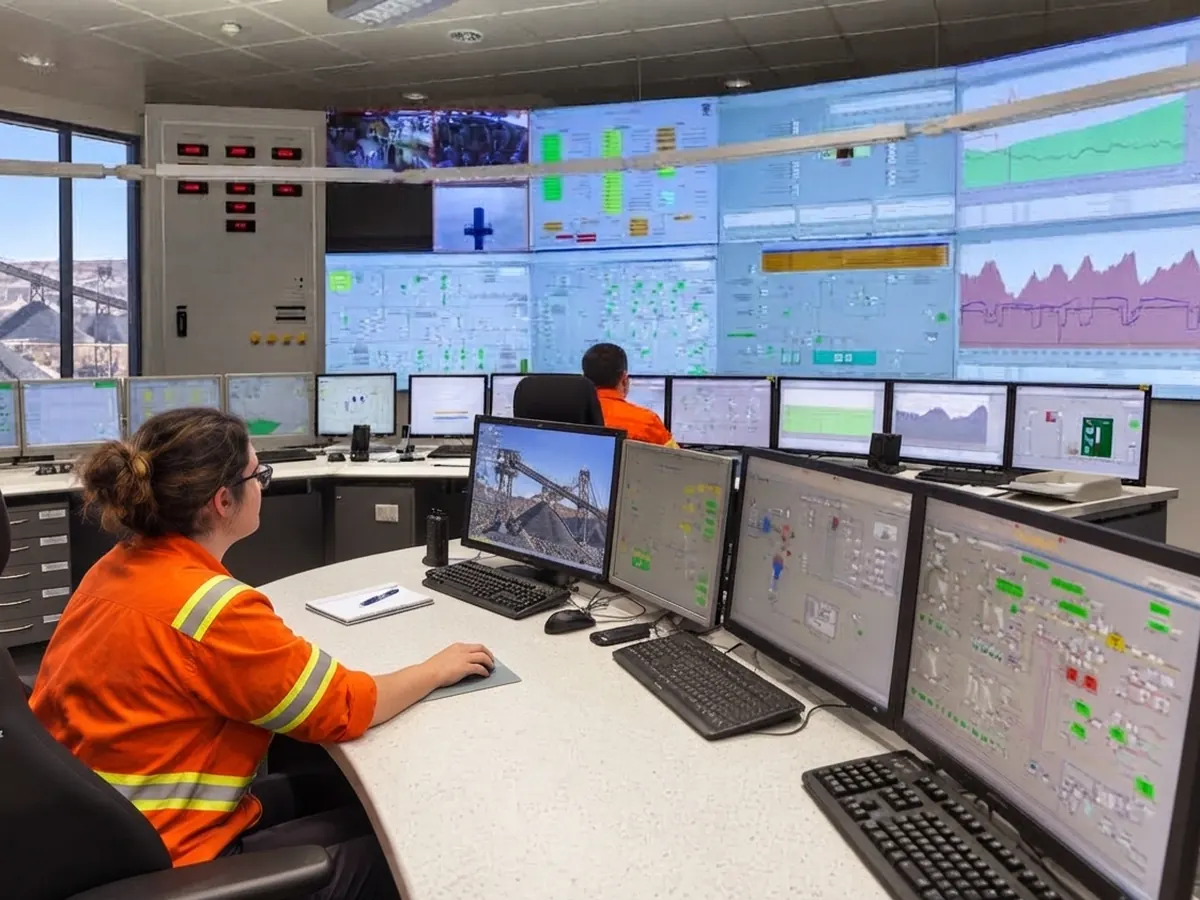
A mine builds a new truck wash and inspection bay, and the control room operator gets a fifth screen for its cameras, its interlocks and its alarms. The engineering answer was to put the monitor where there was room. The Human Factors answer started with where the operator's eyes already go, what the west window does to that screen at four in the afternoon, and which of the new alarms actually need a person.
- Domain
- Mining, plant control room
- System
- Truck wash and inspection bay: cameras, gate interlocks and alarms brought to the control desk on a fifth screen
- Roles
- Control Room Operator, Bay Attendant, Shift Supervisor
- Modes
- Normal, bay occupied, camera loss, night shift, winter afternoon
- Standards basis
- ISO 11064-3, -4, -5, -6, governing · EEMUA 191 · the site hazard plan
- Method chain
- Link Analysis
- ErgoDesign
- ErgoGlare
- ErgoAIR
- SHERPA
- Trigger
- A control system change under the site's management-of-change procedure and its vehicle and pedestrian hazard plan
- Captures
- ErgoSphere 1.6.2
Frame the problem
Plan 1: do 1.1, 1.2, 1.3 in order. Return to 1.1 if 1.3 changes the question.
1.1What the client asked for
PracticeThe management-of-change form had one line for Human Factors and the project engineer had filled it in: "Additional monitor at CRO desk, ergonomic assessment required." The drawing attached showed the plant control room desk with its four existing screens and a fifth on a new arm to the right, where the desk had space. The bay itself was three months from commissioning. The control system integrator had already listed the points that would come to the desk: four camera feeds, the gate and interlock states, a gate release control, and eight alarm conditions.
"Ergonomic assessment" of a monitor is a real piece of work, and a small one. It is also the wrong question, and it is the wrong question in a way that would have been invisible if the practitioner had answered it as asked. What was being installed was not a monitor. It was a new task, the release of a gate that lets a two-hundred-tonne truck into a bay where a person works, placed on a desk that already carried a plant.
1.2What actually changed for the operator
PracticeA plant control room operator runs the processing plant from four screens: an overview of the circuit, the trends and alarm list, a camera wall for the crushers and conveyors, and the fleet dispatch view. They talk to the field on two radios and a phone, keep a log, and glance at the plant itself through a window that faces west across the yard. The desk has settled over years into a layout the operators no longer think about. Their eyes go where they need to go without a decision.
Four screens is about what a seated operator can hold in view without turning the head, and four is what this desk had settled around: everything the operator needs sits inside one sweep of the eyes. That is why four screens are easy and the fifth is the case. A fifth screen is not one more of the same. It has to go somewhere the eyes do not already go, and it competes for the attention the other four already have.
The new bay adds a fifth screen with four more camera feeds and a mimic of the bay's gates and interlocks. It adds a control: the gate release, which opens the entry gate for a truck once the bay is clear. It adds a person in the loop who was not there before, the Bay Attendant, who works inside the bay between trucks and whose safety depends on the interlock and on the operator not releasing the gate while they are in it. And it adds eight new alarm conditions to an alarm list that was already, by the operators' own account, "busy at shift change".
Three things about the desk change at once. Where attention has to go now includes a screen it has never gone to. What the operator is responsible for now includes a person's position in a bay they can only see on camera. And what interrupts them now includes eight conditions nobody has yet decided are worth interrupting for. Written as a question:
Where must the bay's screen and control sit for the operator to run the gate-release task safely without degrading the plant tasks already on the desk, what does the west window do to that screen, and which of the bay's conditions genuinely need the operator's attention?
The word "safely" in that sentence is doing specific work. The gate release is the one operation on this desk that can hurt someone directly, so it gets an error analysis of its own, whatever the change form said about monitors.
Where the room was in the drawing
The fifth screen was drawn on the right because the right had space. Nobody had asked where the operator looks most, or that the west window, at 4 pm in June, puts the sun about where a screen on the right would be. Space on a desk is the last criterion for placing a display, not the first. Every other criterion in this example came from asking what the operator does, not what the desk has room for.
1.3The boundary, the roles and the modes
PracticeIn ErgoSphereThe boundary: the control desk, its screens, radios and window, the bay's screen, mimic, gate release and alarms, and the radio link to the attendant are in. The bay's own interlock logic, the plant control system and the truck fleet are out, and are inputs. The roles: Control Room Operator, Bay Attendant and Shift Supervisor, as positions. The modes: normal, bay occupied, camera loss, night shift, and one the practitioner added after standing at the desk at four in the afternoon: winter afternoon, when the sun comes through the west window low enough to matter.
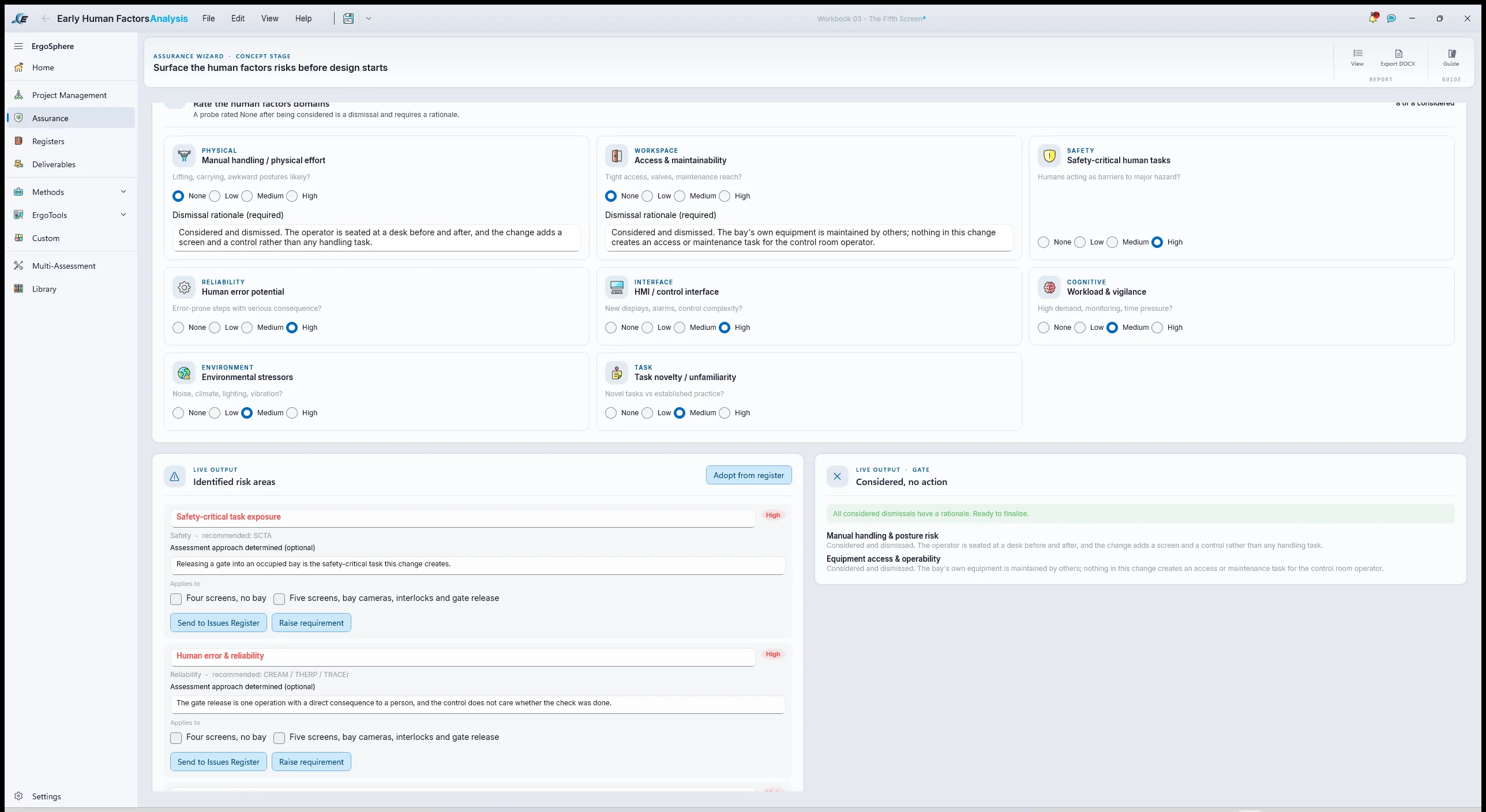
In ErgoSphere the roles go into the Role Register and the framing is written as the Early Human Factors Analysis, run as a wizard with the standards lens set to IOGP 454, the process-industry lens, because the wizard offers no mining lens and a mine's management-of-change process is closest to the one that standard describes. The lens sets the report's framing and file naming; the eight probes are the same under every lens, and the governing standard for the design is still ISO 11064. The change is entered as its before and after states. The Control Room Operator is the primary end-user group and the Bay Attendant the secondary, which is the first time anyone had written the attendant down as a user of this system. The eight domain probes are rated: the HMI probe high, human error potential high because of the gate release, environmental stressors medium for the window, workload medium, the physical probes considered and dismissed with their reasons. Each rated probe becomes a risk area with a recommended method, and the significance level is set at medium with its reason: one operation with a direct consequence to a person.
Establish the standards basis
Plan 2: do 2.1; then 2.2 for the standards that go into the register; then 2.3 for the documents read but not loaded.
2.1How to find what applies
PracticeMining has less Human Factors standardisation than rail or defence, and more regulation. The list is assembled the same way, top down, and the top is heavier than usual.
- The regulator and the site's own hazard plans. The state's mining safety regulation places duties on the operator for control rooms and for vehicle and pedestrian interaction, and the site discharges them through its hazard management plans. The plan for vehicle and pedestrian interaction is the criterion document for the gate release: it says what "bay clear" has to mean.
- The site's management-of-change procedure. The document that made this work happen. It sets the gate the work has to pass and the sign-offs it needs.
- The governing design standard. ISO 11064, the control-centre standard, in the parts this change touches: part 3 for the layout of the room, because a screen and a window are in the same field of view; part 4 for the workstation; part 5 for displays and controls; part 6 for the environment, which is where lighting and glare live. It governs because the site's engineering specification adopts it for control rooms and because it is written for exactly this workstation. It also supplies its own numbers, viewing angles, gaze limits and distances, so this example needs no second standard for criteria.
- Alarm management good practice. EEMUA 191, which the site's alarm philosophy already cited, and which gives the alarm-load benchmarks the rationalisation is tested against.
- Interior lighting good practice. AS/NZS 1680, read for the control room lighting clauses and the glare limits they point at.
The criterion is in the hazard plan, not the standard
ISO 11064 will tell a designer how to lay out a desk. It will not tell them what proof of "bay clear" a mine's own plan demands before a gate opens. On a site like this the standards give the design its shape and the hazard plans give the safety-critical task its criterion. Put both in the basis and say which is which, because at stage 5 the SHERPA finding on the gate release is read against the plan and the workstation finding against the standard.
2.2Into the register, by hand
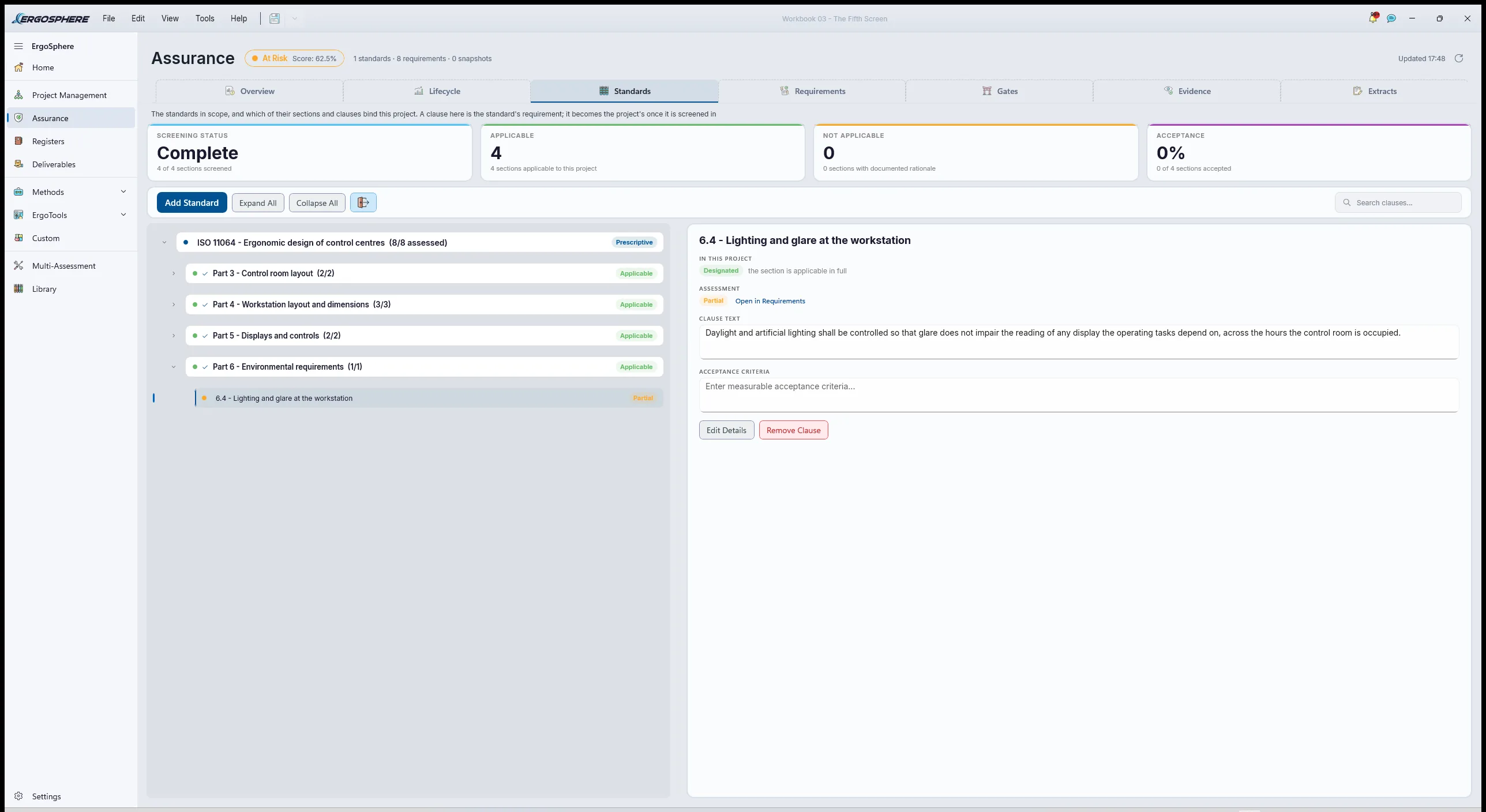
In ErgoSphereISO 11064 is not in the Standards Register's library, and that is the normal condition: no library holds every standard a site can call up. The register's Custom tab is for exactly this. The governing standard is entered as a requirement set with its code, title, edition and type, Prescriptive, and then its sections and clauses are added by hand, only the ones this change touches. Four sections went in, one per part, with the clauses on the arrangement of displays relative to windows, workstation dimensions and viewing angles, display and control layout, and lighting and glare. Typed clauses are not transcriptions, so the professional judgement on each records the edition it was taken from and the page of it. The set is then screened section by section like any library standard, Applicable, Partial or N/A with a dated decision, and it appears in the applicability statement with the same standing a library standard would have. A standard entered by hand is not a lesser standard. It is the governing one, and the register treats it so.
2.3Read, not loaded
PracticeEEMUA 191 and AS/NZS 1680 shaped decisions without going into the register clause by clause. EEMUA 191 is the benchmark the alarm rationalisation tool builds in, so it is cited from there. AS/NZS 1680 supplied the lighting context the glare analysis was read in. The hazard plan is held in the Document Register as the criterion for the gate release, and every requirement and finding that answers to it names it. Read but not loaded is recorded as such in the judgement of the clauses each one informed.
Choose the methods
Plan 3: do 3.1; then 3.2 for each candidate; then 3.3 to record the choices.
3.1The questions the methods must answer
Practice- Attention. Where does the operator look and reach now, how often, and how much does each link matter? Only then: where should the new screen go so the links it adds are short and the links it crosses are few?
- Fit. Given a candidate position, does every display sit in an acceptable visual zone for the whole operator population, and does the release control sit within reach?
- Light. What does the west window do to that position across the year, in a number the requirement can be read against?
- Interruption. Of the eight new conditions, which need a person to act, how fast, and what does the worst bay upset do to the alarm list?
- Error. On the gate release, what can go wrong, how badly, and what would catch it?
The constraints: the bay was three months out, so nothing could be measured on the real system; the desk and the room existed, so both could be modelled from survey; and two shifts of observation were available, one of them a winter afternoon.
3.2The candidates, and the roads not taken
PracticeTaken
Link AnalysisEvery element on the desk, every link between them the operator actually makes, its observed frequency and its importance, weighted into a link value. Then the same elements in candidate layouts, compared to the baseline. It is old, it is simple, and it answers the placement question with a number a project engineer will accept.
Not taken
Eye trackingBetter data, and the platform's capture tools would have taken it. But the bay screen did not exist, so eye tracking could only have measured the current desk, which observation already did well enough. Noted for the commissioning trial, where the new layout can be measured for real.
Taken
ErgoDesign, then ErgoGlareOne model serves both. The room, the west glazing, the desk and the screens are built in ErgoDesign and scored for visual zones and reach, and the same model is handed to ErgoGlare's indoor mode for a physically based daylight glare result at the operator's own viewpoint. Two questions, one geometry, no re-drawing.
Not taken
A lux meter and an afternoonThe usual answer, and it would have found the June problem. It would not have found the March problem, or said how many afternoons a year the screen is unreadable, or let the practitioner test a blind, a film and a relocation before choosing one. Measurement confirms; it does not design.
Taken
ErgoAIRRationalisation upstream of the alarm configuration: for each condition, the indication, the response, a severity and a time to respond, with priority resolved from a matrix rather than typed. It draws the line between alarm and event, tests the worst upset against the first-ten-minutes ceiling, and flags any indication that is the only thing telling the operator something that matters.
Not taken
Let the integrator's default standThe integrator had configured all eight as alarms, as integrators do, because an alarm is the safe default for the person configuring it. It is the unsafe default for the person receiving it. Rationalising later, after the operators have learned to acknowledge without reading, is the way most alarm floods are born.
Taken
HTA, then SHERPAA short task, decomposed, then walked for credible error modes with consequence, recovery and criticality. It is the right size of method for one operation with one serious consequence, and its remedial strategies land in the four headings the design team can act on.
Not taken
Safety Critical Task AnalysisSCTA is the fuller treatment and the site's major-hazard tasks get it. The gate release is a single operation with a single hazard, not a major accident scenario, and SCTA's extra structure would have added days without adding a finding. Recorded as considered, so that nobody at the gate review asks why the site's heavier method was not used.
3.3Recording the choice
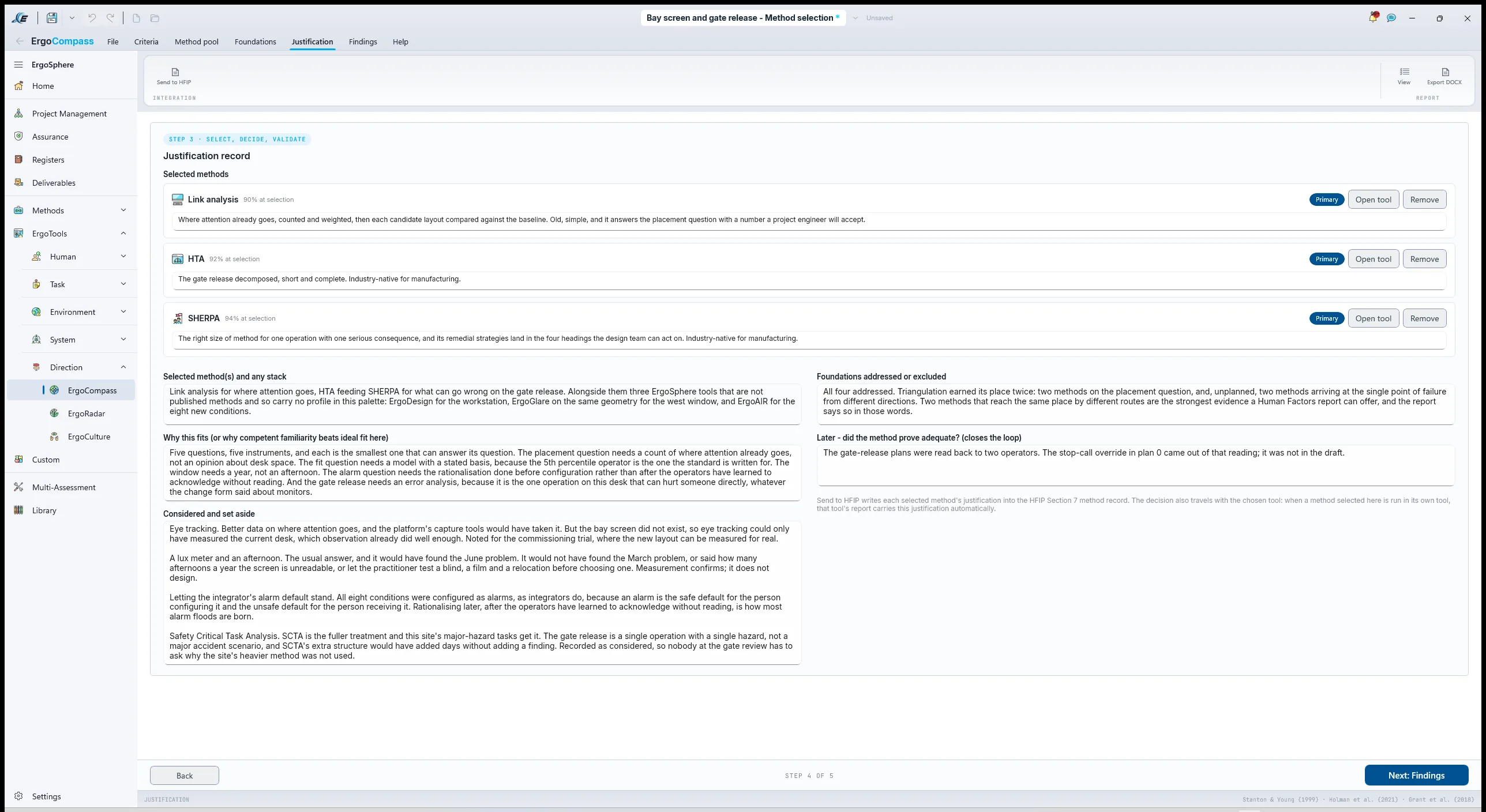
In ErgoSphereErgoCompass, industry set to Manufacturing as the nearest of its options to a processing plant, problem kind set to human error or reliability for the gate release with the HMI question in the problem statement, ranks its palette and flags the methods native to the industry. The foundations panel is answered honestly: data gathering addressed by the two shifts of observation, HTA addressed for the gate release only, decomposition addressed, triangulation addressed by the two placement methods. The palette it ranks is published methods, each with a complexity profile, so link analysis, HTA and SHERPA are selected in it while ErgoDesign, ErgoGlare and ErgoAIR are named in the justification prose: they are ErgoSphere tools rather than methods with a profile of their own, and the record says so rather than pretending otherwise. The justification record's "considered and set aside" field holds the four forks above, eye tracking among them, noted for the commissioning trial. Send to HFIP writes each selection's reasoning across into the Integration Plan, whose screening reads Modified, High and Demanding.
Run the analysis
Plan 4: do 4.1; then 4.2 for each candidate position; then 4.3 on the position 4.2 prefers; 4.4 can run in parallel from 4.1; do 4.5 last, and return to 4.2 if 4.5 moves the release control.
4.1Link Analysis: where the eyes and hands already go
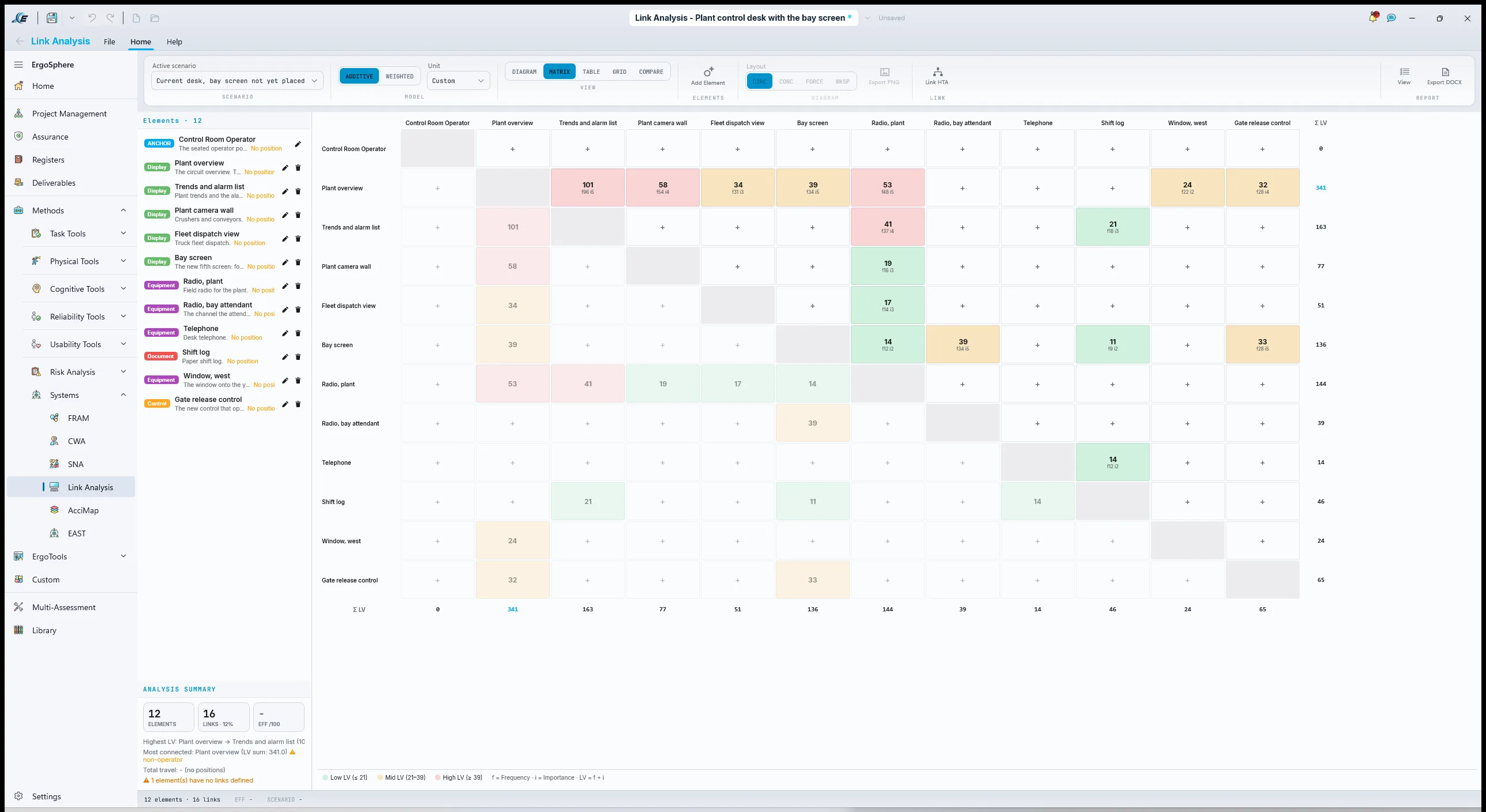
PracticeIn ErgoSphereTwo shifts at the desk with a tally sheet. Every element the operator uses is listed: the four screens, the two radios, the phone, the log, the window, and, as a placeholder, the bay screen and the release control. Every time the operator's attention moves from one element to another, that is a link, and it is tallied. At the end of the shift each link has a frequency, and in the debrief each is given an importance from the operator's own account of what happens if that link is slow. The gate-release sequence was walked as a talk-through, since the bay did not exist, and its links were added with the frequency the bay's expected traffic implied.
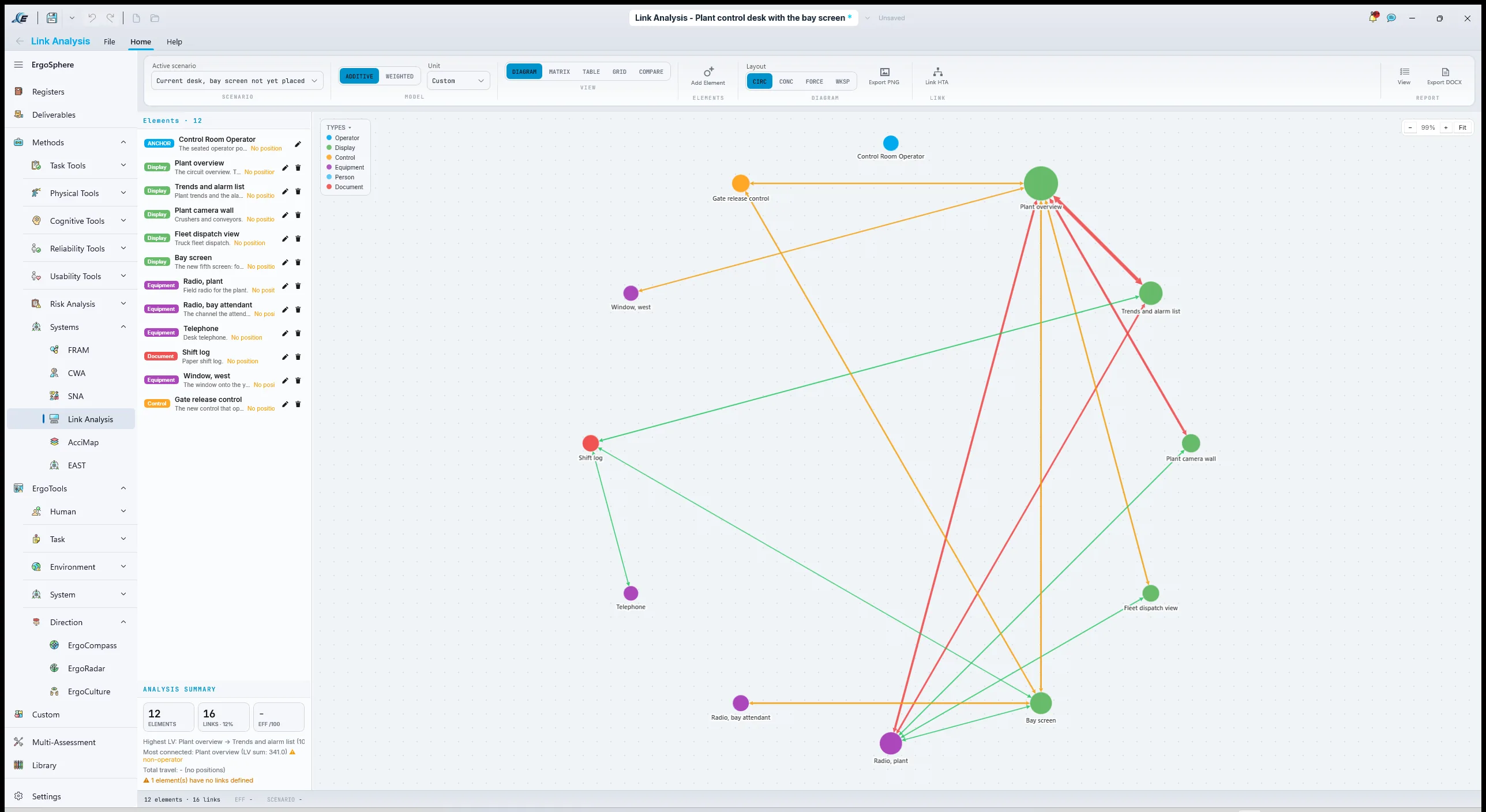
In ErgoSphere the elements go into the model with their positions and the links into the LINKS table with From, To, frequency, importance and distance. The weighting is on the page in the tool's own notation, link value equals frequency times its weight plus importance times its weight, so a reviewer can see how the number was made. The current desk is the baseline scenario; two more scenarios place the bay screen on the right, as drawn, and centre-left, between the overview and the trend screen, and each scenario reports a layout efficiency and a weighted travel figure against the baseline. The diagram draws the links by value, so the thick ones are the ones that matter.
The finding was not subtle once drawn. The gate-release sequence links the bay screen to the plant overview, where the interlock mimic also shows, and to the radio. On the right, that link crossed the whole desk and the highest-value link on the new screen became the longest one on the desk. Centre-left, it was adjacent to the overview and the radio, and the plant's existing high-value links were untouched.
How to run a Link Analysis
- List the elements. Every display, control, communication device, document and view the operator uses, including the ones being added.ELEMENTS in the model, each with a position.
- Tally the links. Every movement of attention or hand from one element to another, over a period that includes the busy times.LINKS: From, To, Freq, with the tally sheet transcribed.
- Rate importance with the operator. What happens if this link is slow. The operator knows; the observer does not.Imp. on each link, and the weights the value uses.
- Set the baseline and the candidates. The desk as it is, then each proposed layout as its own scenario.Scenarios, with Compare baseline vs.
- Read the top links and the diagram. The thick links are the ones that matter. A new element whose highest-value link is its longest is in the wrong place.The DIAGRAM, EFF /100, weighted travel and Key Findings.
4.2ErgoDesign: the desk, the screen and the window
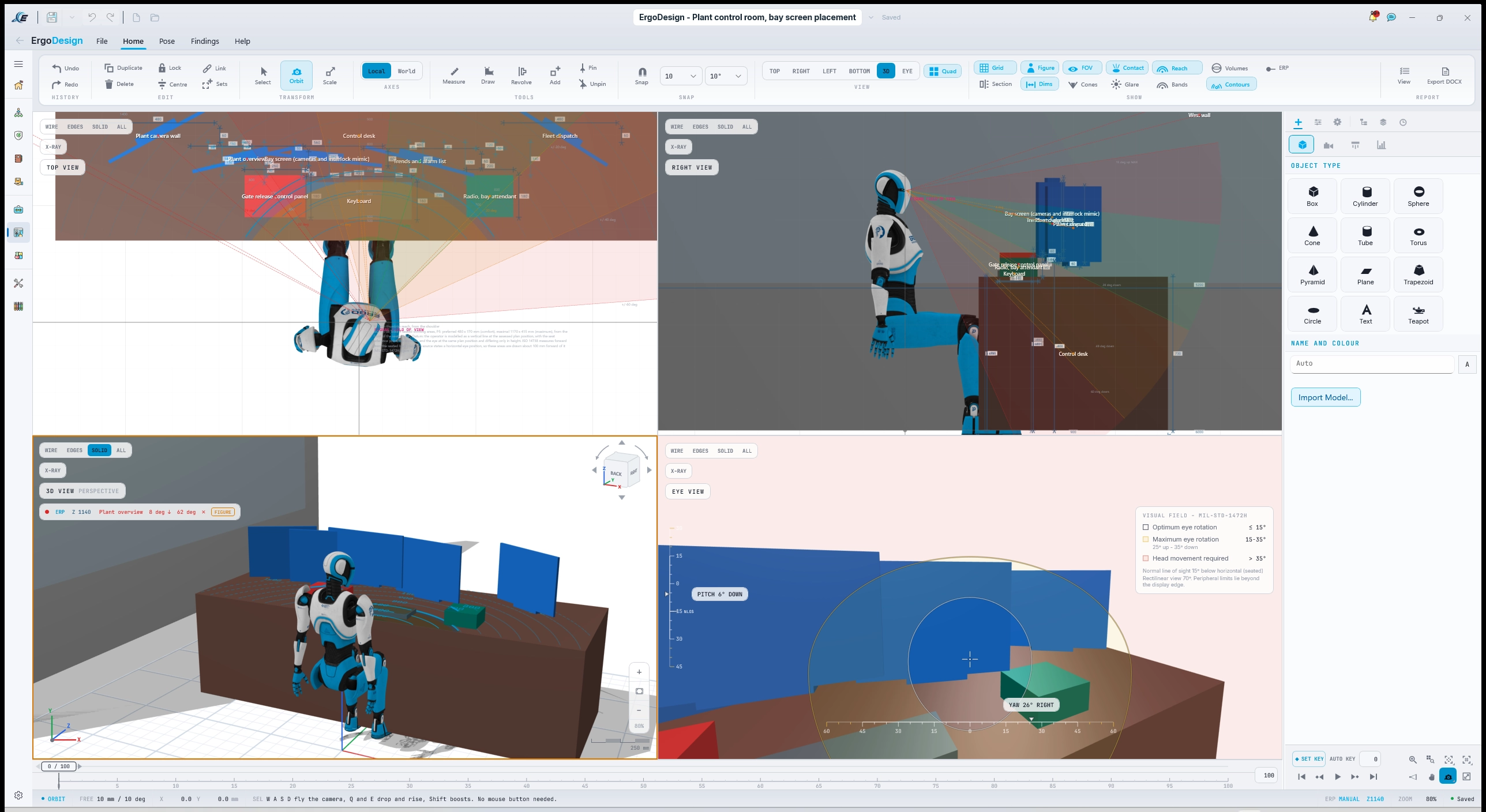
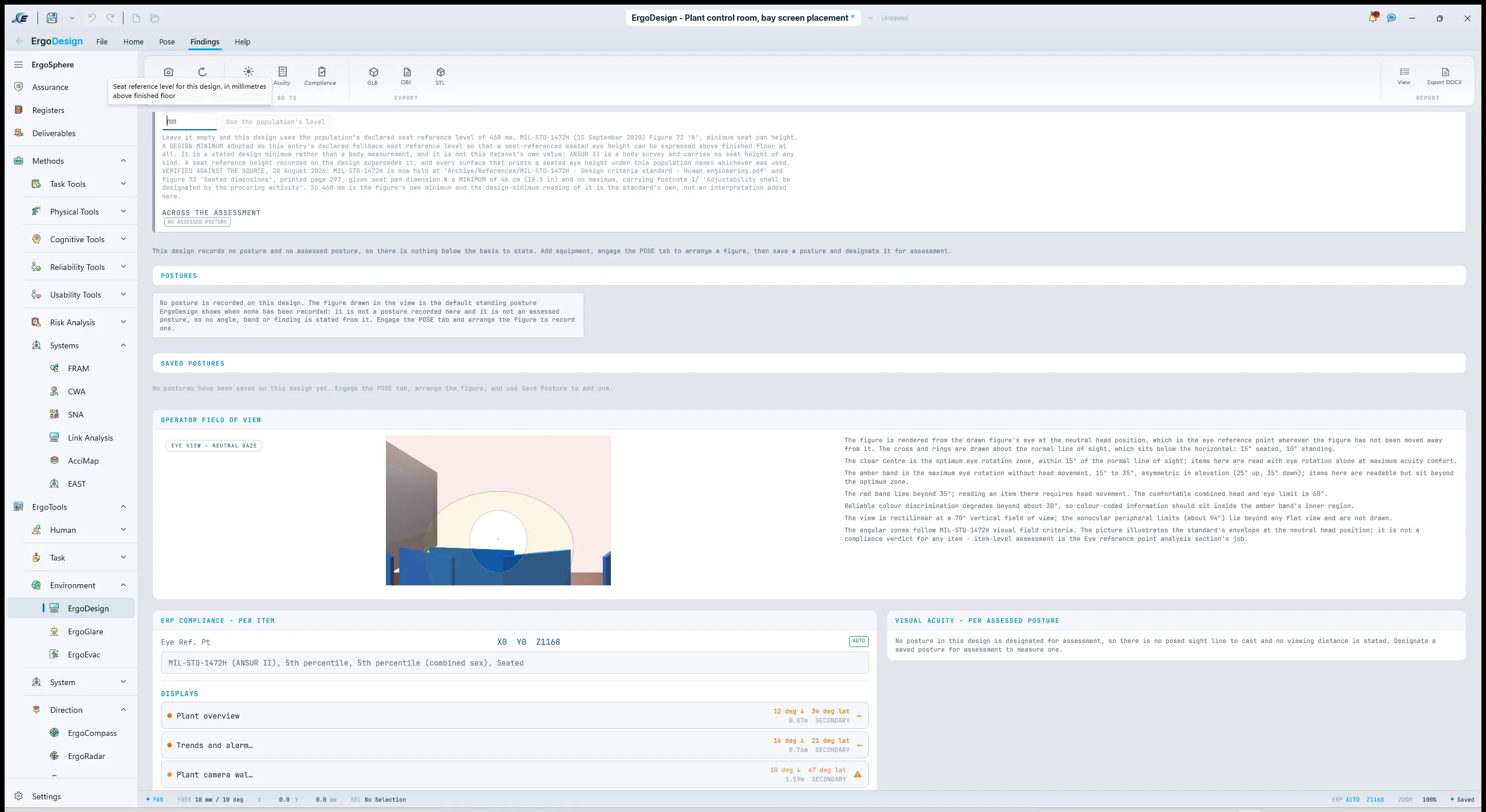
PracticeIn ErgoSphereThe room is modelled from the survey: the desk, the seat, the four screens, the release control panel where the integrator proposed it, and the west wall with its glazing as a real surface, because the glare analysis will need it. The Basis is set before anything is read: percentile, sex selection, the anthropometric population the site's specification uses, reference posture seated. The eye reference point is computed from those, and the vision cone standard is set to ISO 11064, because it is the governing standard and the one UR-SYS-01 cites; the selector offers others, and the session report names the one used.
One thing the Findings page does here is worth copying. No posture has been recorded on this design, so it says so, in those words, and refuses to state a single angle or band from the figure standing in the view: "it is not a posture recorded here and it is not an assessed posture". The visual acuity panel is empty for the same reason, because there is no posed sight line to cast. The eye reference point analysis still runs, because that comes from the Basis rather than from a posture. A tool that quietly produced a number from an illustrative figure would be easier to demonstrate and worth much less.
The two candidate positions from 4.1 are modelled in turn. On the right, the bay screen sat in the secondary zone at Acceptable for the 95th percentile and the tertiary zone at Marginal for the 5th, and the panel's glare risks row already showed a veiling angle against the west glazing before ErgoGlare had been opened. Centre-left, it sat in the primary zone at Optimal for both, the plant overview stayed Optimal, and the release control on the panel came inside the preferred reach area. The Findings page reports every item with its angles, distance, zone and compliance, and Capture embeds the views into the session report.
4.3ErgoGlare: what the west window does across a year
PracticeIn ErgoSphereGlare is two problems that get one word. Light reflecting off the screen, which is a matter of the screen's surface and the angle of the source; and the window itself sitting bright in the operator's field of view beside the screen, which is discomfort glare and is what the Daylight Glare Probability measures. UR-SYS-02 is written for the second, because it is the one that determines whether the operator can look at the bay screen at all at four in the afternoon, and it is the one a physically based simulation can put a number on.
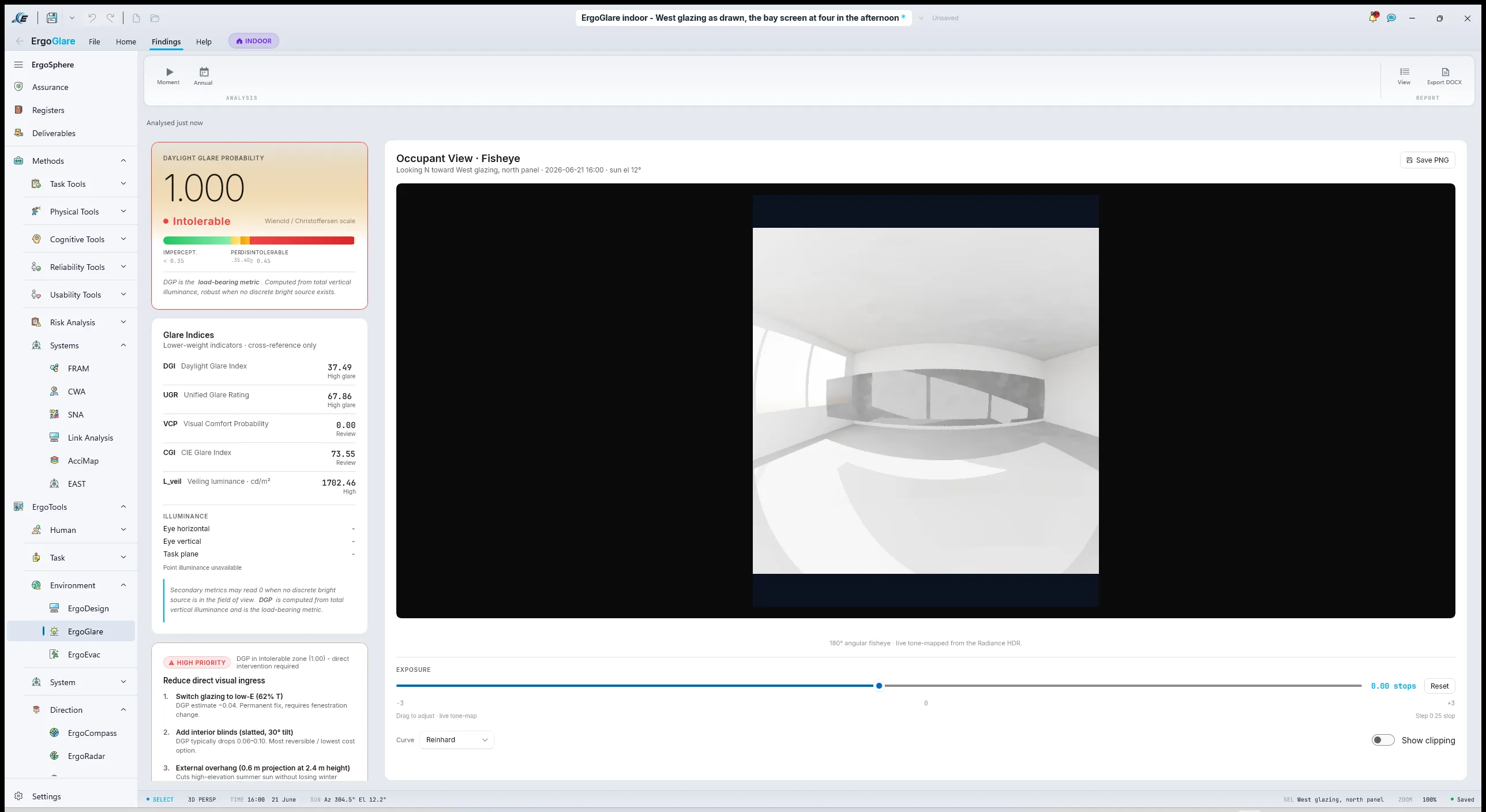
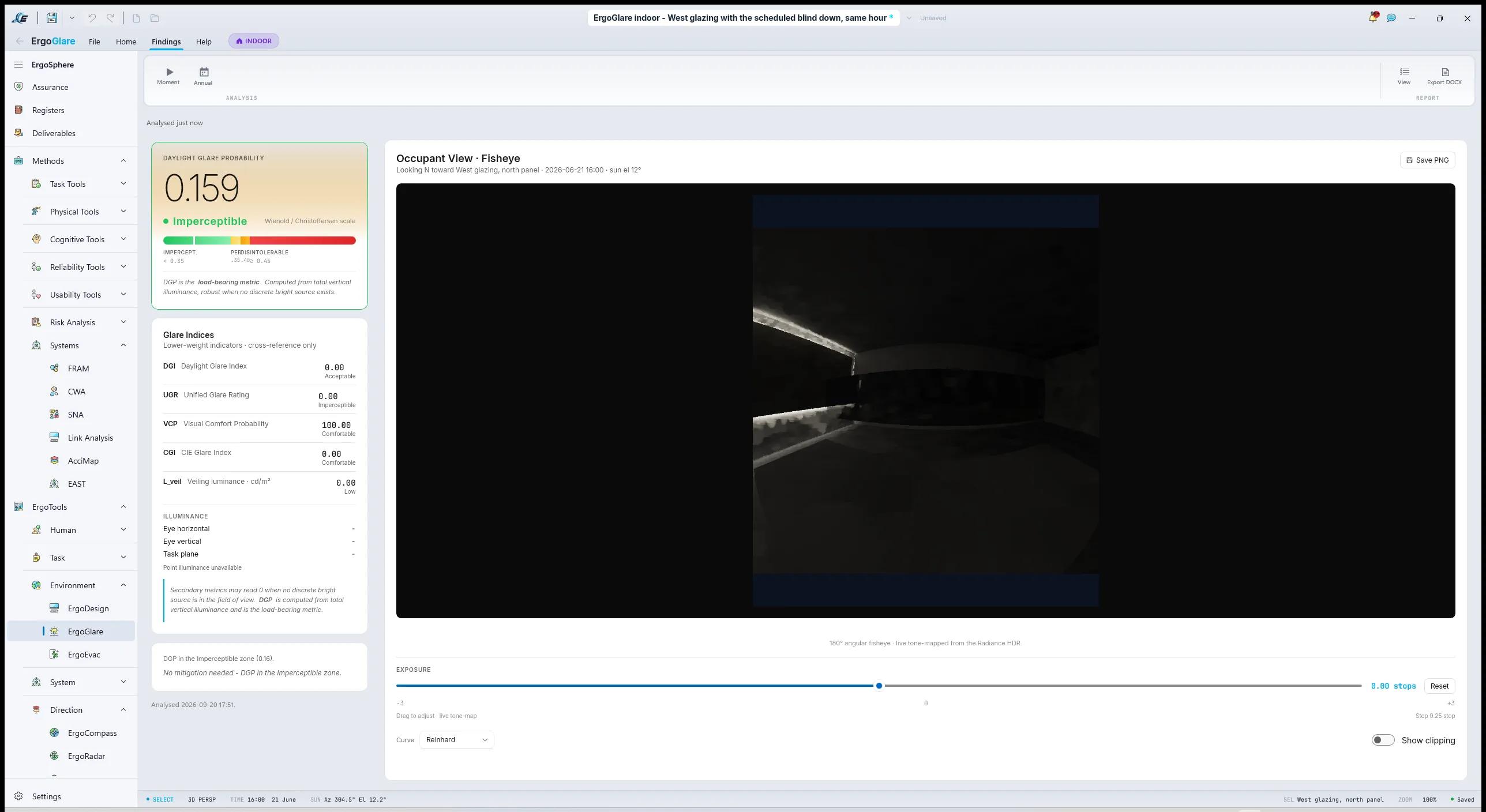
ErgoGlare's indoor mode takes the ErgoDesign model, the room, the glazing, the desk, and the operator's assessed viewpoint looking toward the bay screen, and runs a physically based lighting simulation on it. The output is an HDR render from the operator's own eye, with an exposure slider and tone-mapping so the practitioner can see what the number describes, and the full metric set for that view at that moment: Daylight Glare Probability, Daylight Glare Index, Unified Glare Rating, Visual Comfort Probability and the veiling luminance. The site is geolocated, so the sun is where it really is.
The condition to model is the one the operators named: four in the afternoon on the winter solstice, clear sky. At this latitude that puts a low sun in the north-west, shining straight down the west wall. Three cases were run on the same geometry and the same hour, changing only what is on the glazing.
| West glazing | DGP | DGI | UGR | Veiling luminance | Against UR-SYS-02 |
|---|---|---|---|---|---|
| As drawn, clear single glazingnormal transmittance 0.78 | 1.000 | 37.5 | 67.9 | 1702 cd/m² | Intolerable; fails |
| Solar film on the glazingtinted, normal transmittance 0.43 | 1.000 | 36.0 | 64.3 | 928 cd/m² | Intolerable; fails |
| Scheduled blind downopaque, modelled inside the glass | 0.159 | 0.0 | 0.0 | 0 cd/m² | Imperceptible; passes |
The film halves the brightness and changes nothing
The expected answer was that a film would nearly do, and a blind would do. The simulation says something more useful. Halving the glazing's transmittance halves the veiling luminance, 1702 down to 928 candela per square metre, and the Daylight Glare Probability does not move at all: it stays saturated at 1.000. A tint darkens the background; it does not remove a sun disk from the field of view, and DGP is driven by the luminance of the source, not the average of the scene.
So the film is not the cheap fallback the project wanted it to be. It fails in exactly the same band as doing nothing. Only interrupting the line of sight works, which is what the blind does, and the blind case drops to 0.159 with the veiling luminance at zero. That is a decision a facilities budget can be argued from, and nobody would have reached it by reasoning about percentages.
How to assess daylight glare in ErgoGlare
- Bring the model in. The room, its glazing and the workstation, from the ErgoDesign model rather than drawn again.Indoor mode; the ErgoDesign model converts across.
- Geolocate the site. The sun has to be where it really is, on every day of the year.The site on the map; annual sun paths.
- Set the viewpoint. The operator's assessed eye reference point, looking at the display in question.The occupant viewpoint and its target.
- Run the hour that the complaint names. The worst credible condition, chosen from what the operators describe and the sun path confirms, rather than the day the surveyor happened to visit.Date, time and sky condition; the engine runs from the occupant's eye.
- Read the number against the bands, then look at the picture. DGP against imperceptible, perceptible, disturbing, intolerable; then the HDR render with the exposure slider.The occupant-view render and the DGP tile.
- Test the mitigation and re-run. A blind, a film, a relocation. The cheapest one that passes wins.Edit the model, run again, compare.
4.4ErgoAIR: which of the eight conditions need a person
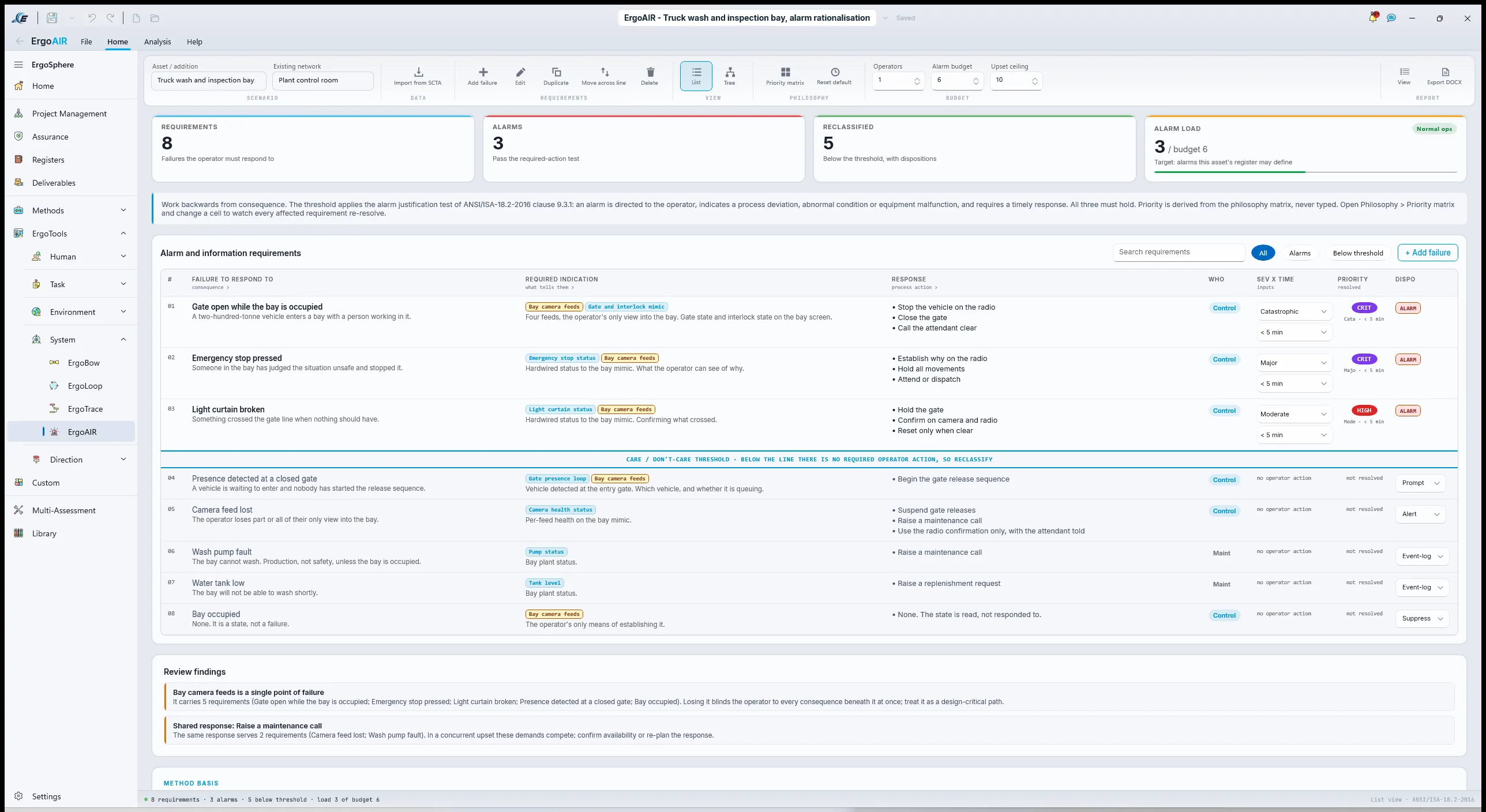
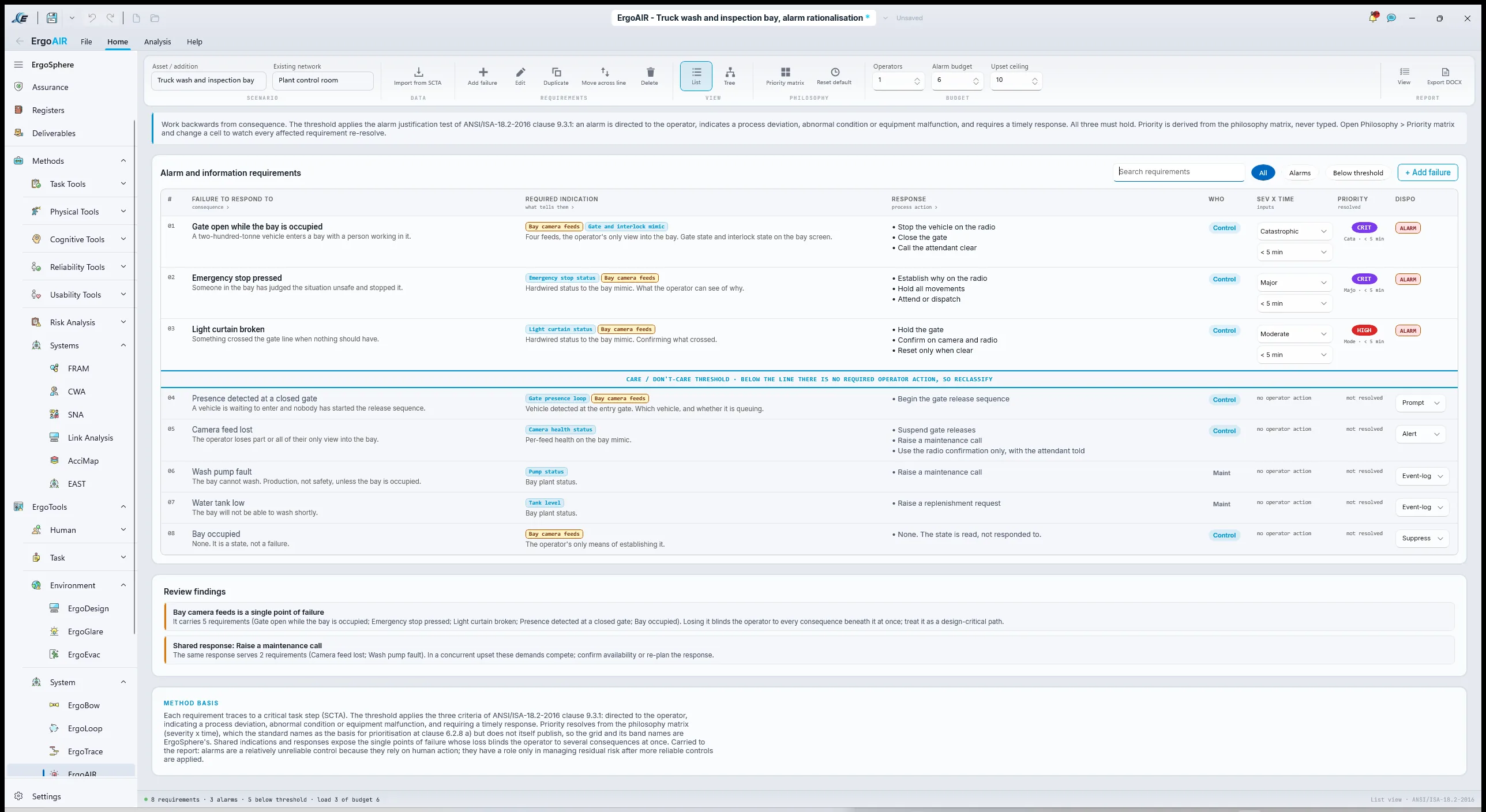
PracticeIn ErgoSphereThe integrator's list: gate open while bay occupied, emergency stop pressed, presence detected at a closed gate, wash pump fault, water tank low, camera feed lost, bay occupied, light curtain broken. All eight configured as alarms. ErgoAIR's worksheet takes each one and asks the questions the integrator was not asked: what is the failure the operator must respond to, what indication tells them, what is the response, how severe is the consequence if they do not, and how long do they have. Priority resolves from the severity-by-time matrix, and the threshold line then separates true alarms from alerts, prompts and event-log entries.
Three stayed above the line as alarms: gate open while occupied, emergency stop, and light curtain broken, all with a person's safety as the consequence and seconds as the time. Presence at a closed gate became a prompt, because the response is to start the release sequence and not to react to a hazard. Camera loss became an alert. Wash pump fault and water low became events, unless the bay is occupied, in which case pump fault becomes an alert. "Bay occupied" is not an alarm at all: it is a state, and it belongs on the mimic as an indication. Eight alarms became three.
Then the part the site had not thought to ask. The worksheet surfaces shared indications and shared responders as single points of failure, and it flagged that the only indication of "bay clear" on the operator's side was the camera feeds. The light curtain guarded the gate line, not the bay. Nothing independent of a camera told the operator whether a person was inside. That flag became UR-PRO-01 in its final form, and it was the most important finding in the example. It came from an alarm tool.
4.5HTA and SHERPA on the gate release
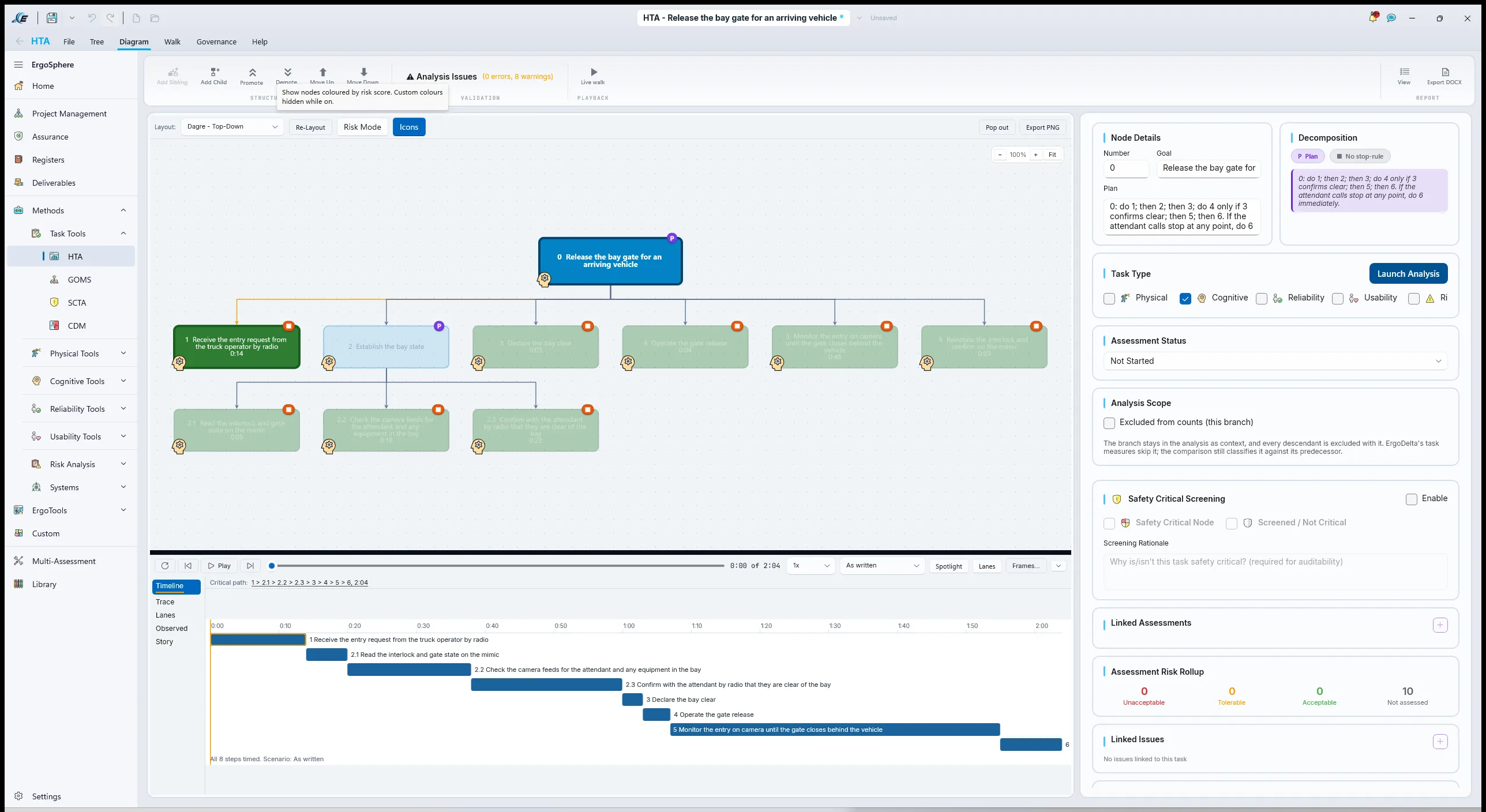
PracticeIn ErgoSphereThe gate release is one operation on a busy desk and the only one that can hurt someone directly, so it gets its own tree, short and complete, from a talk-through with two operators and the bay's designer. The plan carries the safety logic: nothing is released until the bay is confirmed clear, and a stop call from the attendant overrides everything.
- 0Release the bay gate for an arriving vehicle
0: do 1; then 2; then 3; do 4 only if 3 confirms clear; then 5; then 6. If the attendant calls stop at any point, do 6 immediately.
- 1Receive the entry request from the truck operator by radio
- 2Establish the bay state
2: do 2.1, 2.2 and 2.3 in any order; all three before 3.
- 2.1Read the interlock and gate state on the mimic
- 2.2Check the camera feeds for the attendant and any equipment in the bay
- 2.3Confirm with the attendant by radio that they are clear of the bay
- 3Declare the bay clear
- 4Operate the gate release
- 5Monitor the entry on camera until the gate closes behind the vehicle
- 6Reinstate the interlock and confirm on the mimic
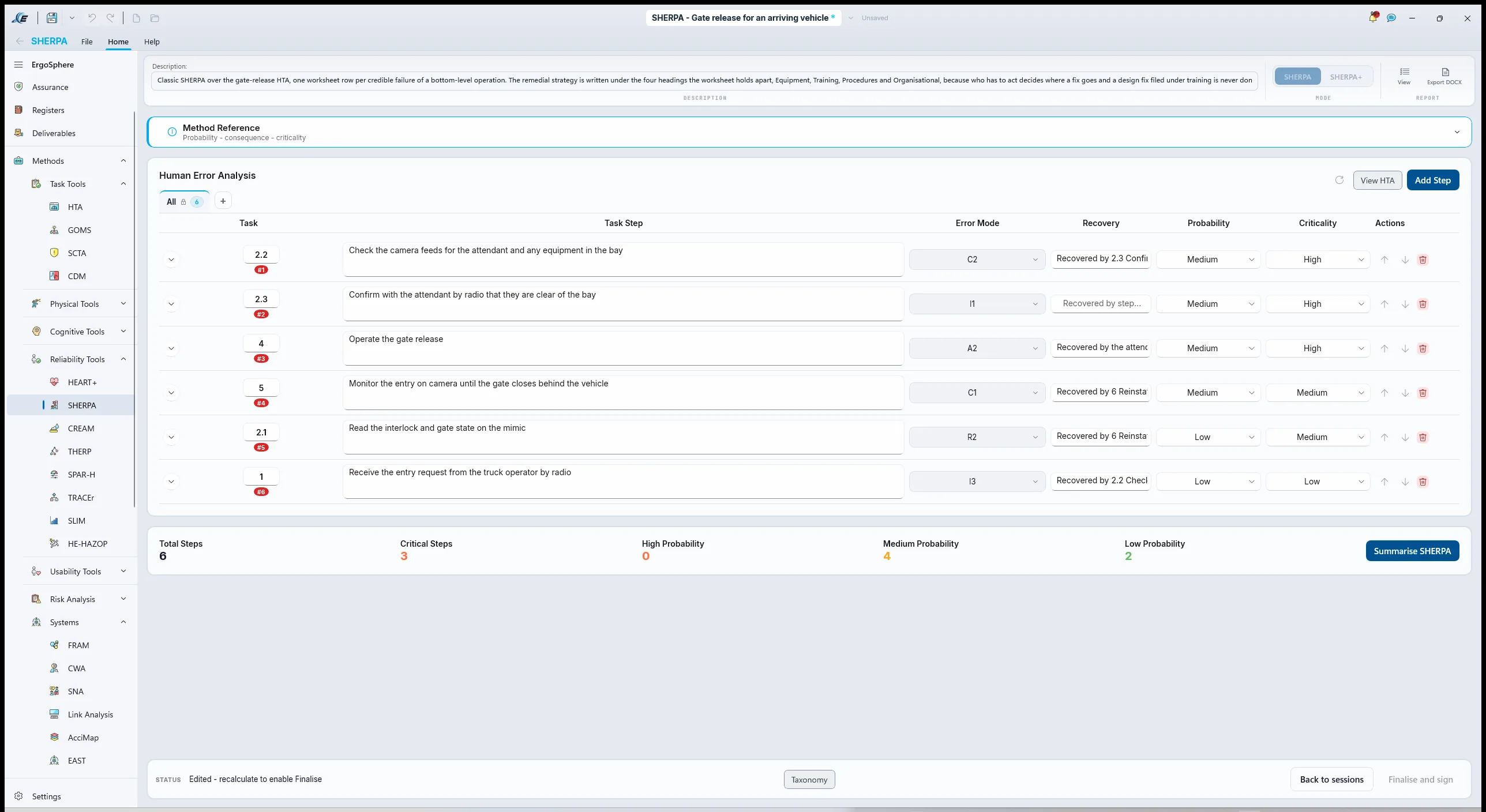
SHERPA in Classic mode, Import from HTA, one row per bottom-level operation, the error mode picked from the taxonomy for each credible failure, with description, mechanism, consequence, recovery, probability and criticality, and the remedial strategy under Equipment, Training, Procedures and Organisational. The rows that mattered:
| Node | Mode | Error | Consequence | Recovery | Crit. |
|---|---|---|---|---|---|
| 2.2 | C2 | Check incomplete: attendant not seen because they are behind the previous truck's cab in a camera blind spot | Bay declared clear with a person in it | At 2.3, if the radio call is made; otherwise none before 4 | High |
| 2.3 | I1 | Information not communicated: radio confirmation skipped when a plant alarm lands during the sequence | Declaration rests on the cameras alone | None before 4 | High |
| 4 | A2 | Operation mistimed: release operated before 3 because a second truck is queued and the operator is being called on the radio | Gate opens with the bay state unconfirmed | By the attendant, if they see the gate move | High |
| 5 | C1 | Check omitted: attention pulled to the plant overview during entry | Vehicle stops short; gate cycle incomplete; interlock state unclear at 6 | At 6, on the mimic | Medium |
Three of the four high-criticality rows have the same shape: the declaration of "clear" rests on the operator's senses and discipline, and the release control does not care whether the declaration was made. The Equipment remedial strategy on row 4 says what the design has to do about that: a presence indication in the bay independent of the cameras, and a release control that is inoperable while it shows occupied. That is UR-PRO-01, rewritten from a procedure into equipment.
Interpret the results
Plan 5: do 5.1, 5.2, 5.3 in order. Return to 3 if any result raises a question the chosen methods cannot answer.
5.1Reading a link analysis
PracticeReading the result
Link values are relative. The efficiency score and the weighted travel mean nothing on their own and everything against the baseline, so the question is never "is 71 good" but "is centre-left better than right, and by how much, and on which links". Read the top ten links by value first. If a candidate layout lengthens any of them, it has to buy that with something. Then read the links the change adds: a new screen whose highest-value link is also its longest is a screen in the wrong place.
Frequencies came from two shifts, which is an estimate, and importances came from operators, which is a judgement. The analysis is honest about both, and it is still the best placement evidence a desk that does not yet exist can have.
5.2Reading zones, and reading glare
PracticeReading the result
A zone and a compliance level are read for the item's job. Tertiary and Marginal on a decorative status panel is a note. Tertiary and Marginal on the screen that carries the bay mimic is UR-SYS-01 failing, because the mimic is a check in the gate-release sequence and the sequence should not need a head turn. Read the worst percentile, not the average one; the 5th percentile operator is the one the standard is written for.
A DGP is read against the published bands, and then read for when. A DGP of 1.000 is the top of the intolerable band: at four on a winter afternoon the bay screen cannot be read at all, and a wash bay is busy at exactly that hour. What the run adds is which mitigation moves it, and the honest answer was not the one the project expected. Look at the render as well as the number. If the number says intolerable and the picture does not, one of them is wrong, and it is usually the model's glazing properties or the view direction.
That last point is not hypothetical. A first run of this study pointed the operator's eye down the west wall instead of at the screens, and returned a veiling luminance of 10 800 candela per square metre. It was a correct answer to the wrong question. The view direction belongs to the furniture, not to the person setting up the run, which is why it is taken from the workstation model.
5.3Reading the rationalisation and the error analysis together
PracticeReading the result
Eight alarms to three is the result the site expected and it is not the finding. The finding is the single point of failure the alarm worksheet flagged and the SHERPA independently found from the other direction: three high-criticality error modes that all reduce to "the declaration of clear rests on the operator", and one indication, the cameras, being the only thing the declaration rests on. Two methods that arrive at the same place by different routes are the strongest evidence a Human Factors report can offer, and the report said so in those words.
The remedial strategies sorted cleanly. Equipment: the independent presence indication and the interlocked release. Procedures: the radio confirmation stays, as a second line, not the first. Training: the camera blind spot goes into the operator induction. Organisational: the queueing of trucks at the gate, which is what created the time pressure on row 4, is a dispatch problem and was handed to dispatch as an issue with their name on it.
The tool that found it was not the tool it was chosen for
ErgoAIR was chosen to rationalise alarms. It found the example's most serious design gap because rationalisation asks, for every condition, what indication the operator actually has, and that question exposed the cameras. Methods answer the question they ask, not the one you hired them for. Read every output for what it found, not only for what you wanted from it.
Write the user requirements
Plan 6: do 6.1 for every finding from 5 that needs a control, and for every clause from 2 that needs a design requirement; then 6.2 across the set; then 6.3 once.
6.1From clause to requirement
PracticeSame anatomy: who, shall, what, under which condition, to what criterion, verified how, and written now, after the results, because that is where they come from. Two of these have a criterion that is a number from the literature rather than from a standard, and the page says where the number comes from. UR-PRO-01 is the clearest case of a finding wound back into the design: at concept it was going to be a procedure, and the error analysis at 4.5 turned it into equipment.
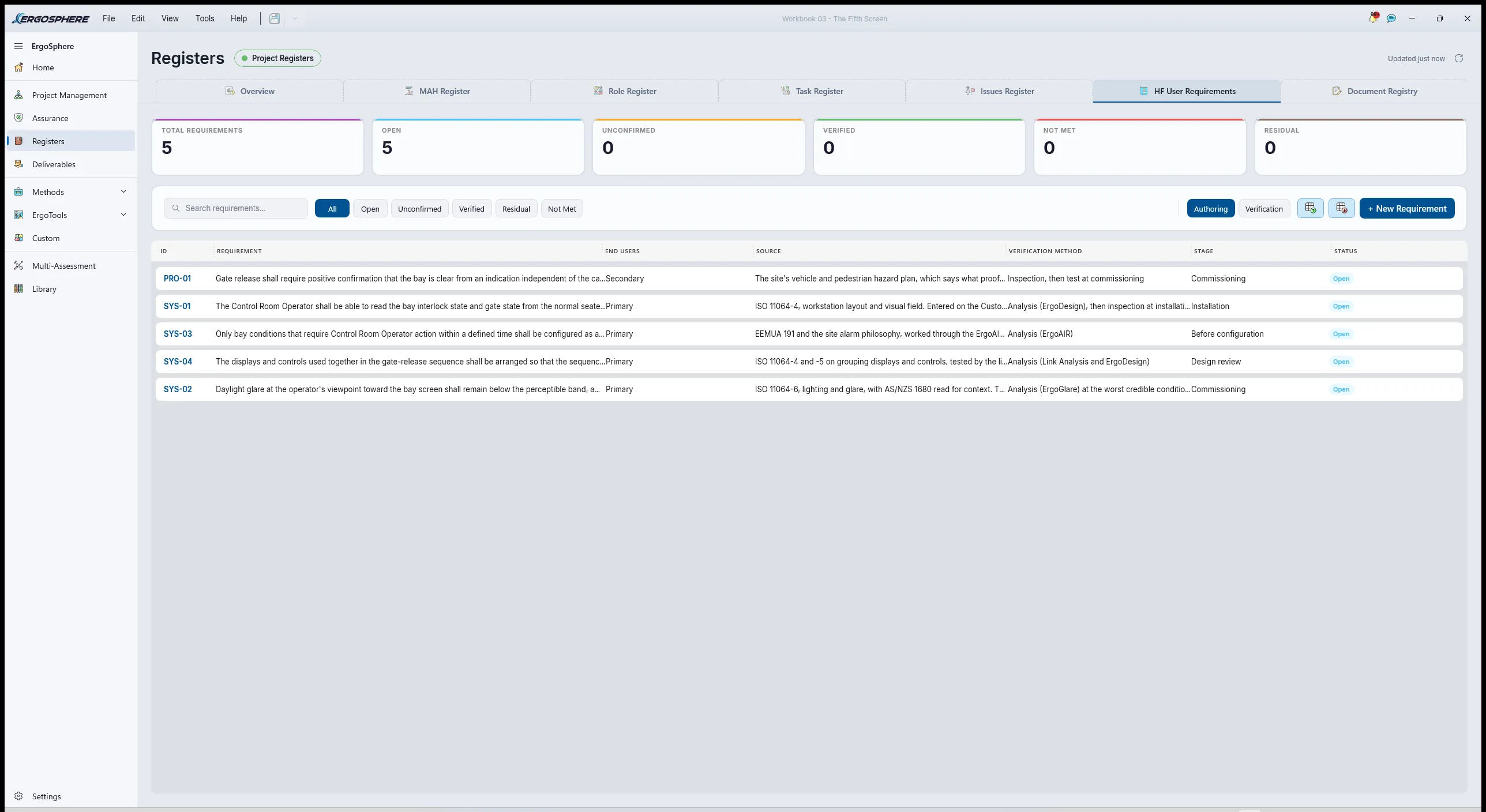
| ID | Source | Requirement | Verified by |
|---|---|---|---|
| UR-SYS-01 | ISO 11064-4, workstation layout and visual field | The Control Room Operator shall be able to read the bay interlock state and gate state from the normal seated posture within the acceptable visual zone, at the 5th and 95th percentile basis, without leaving the plant overview outside the same zone. | Analysis (ErgoDesign), then inspection at installation |
| UR-SYS-02 | ISO 11064-6, lighting and glare; AS/NZS 1680 | Daylight glare at the operator's viewpoint toward the bay screen shall remain below the perceptible band, a Daylight Glare Probability under 0.35, across occupied hours through the year. | Analysis (ErgoGlare) at the worst credible condition, then measurement at commissioning |
| UR-SYS-03 | EEMUA 191, the site alarm philosophy | Only bay conditions that require Control Room Operator action within a defined time shall be configured as alarms; every other condition shall be an alert, a prompt or an event-log entry, and the bay's alarms shall stay within the site's first-ten-minutes ceiling for the defined upsets. | Analysis (ErgoAIR) |
| UR-PRO-01 | The vehicle and pedestrian hazard plan; SHERPA finding on the gate release | Gate release shall require positive confirmation that the bay is clear from an indication independent of the camera feeds, and the release control shall be inoperable while that indication shows the bay occupied. | Inspection, then test at commissioning |
| UR-SYS-04 | ISO 11064-4, grouping of displays and controls | The displays and controls used together in the gate-release sequence shall be arranged so that the sequence needs no more than one head movement from the operator's normal line of sight. | Analysis (Link Analysis and ErgoDesign) |
Where 0.35 comes from
The Daylight Glare Probability bands, imperceptible below 0.35, perceptible to 0.40, disturbing to 0.45, intolerable above, are published research thresholds, not a clause in a standard. A requirement can carry a criterion from the literature as long as it says so and the client agrees the number. What it cannot do is pretend the standard supplied it.
6.2Keeping the set honest
PracticeEvery requirement can be failed. UR-SYS-01 fails if a screen lands in the tertiary zone. UR-SYS-02 fails on a number. UR-SYS-03 fails if the rationalisation leaves an event configured as an alarm. UR-PRO-01 fails on inspection. UR-SYS-04 fails if the link analysis puts a high-value link across two head movements. None says "ergonomic", which is the word the change form used, because "ergonomic" cannot be failed.
6.3Into the register
In ErgoSphereThe five go into the HF User Requirements Register with New Requirement, each fixed into its group: UR-SYS-01, UR-SYS-02 and UR-SYS-04 in System, UR-SYS-03 in System with the alarm configuration as its owner, and UR-PRO-01 in Procedure until the error analysis moved its substance into equipment. The Bay Attendant is the end-user group on UR-PRO-01, which is the point of it. Each carries a source narrative in plain words, a verification method and stage, an owner and a status of Open. The register does not point at a clause; the narrative names it, and the clause's own compliance is set later in the Requirements workspace.
Close out
Plan 7: do 7.1 for every finding; then 7.2 for every applicable clause; then 7.3; then 7.4 once.
7.1Findings into the Issues Register
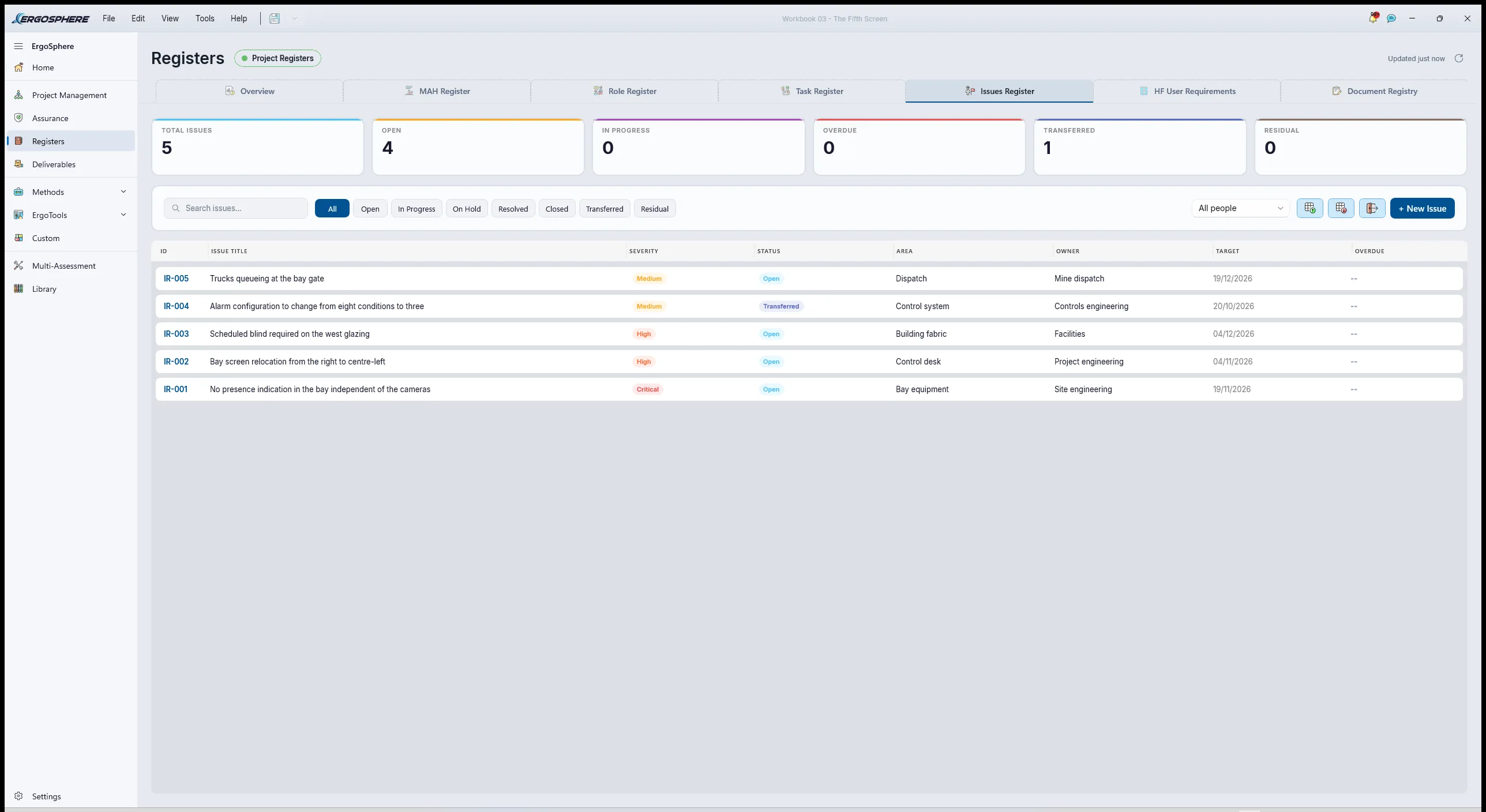
In ErgoSphereFive issues, each raised from the session that found it. The independent presence indication and interlocked release, Critical, owned by site engineering, a condition of commissioning. The bay screen relocation to centre-left, High, owned by the project. The blind schedule on the west glazing, Medium, owned by facilities. The alarm configuration change from eight to three, Medium, owned by the controls engineer, and set to Transferred once it entered the site's own change process, because the register keeps "someone else owns this" apart from "this is done". And the truck queueing at the gate, Medium, owned by dispatch, which is the issue that surprised the meeting most. Each carries its linked user requirements and the session as evidence.
7.2Closing the loop on the clauses
In ErgoSphereIn the Requirements workspace the ISO 11064 workstation and display clauses are set Compliant on the ErgoDesign session, the lighting and glare clause Compliant on the ErgoGlare session with the blind schedule named in the justification, and the part 5 clauses on alarms and their presentation Compliant on the ErgoAIR worksheet. The clauses on grouping displays and controls are Partially Compliant until the relocation is installed, with the relocation issue raised against them and a residual risk statement. Every clause in the workspace came in through the Custom tab, and nothing in the cards, Designated, Compliant, Non-Compliant, Not Assessed, treats a typed standard differently from a library one, which is as it should be.
7.3The assurance argument
In ErgoSphereThe EHFA from stage 1 and the Integration Plan from stage 3 are finalised and signed, freezing each as a dated, hashed version. The close-out wizard then asks for the argument: each requirement closed with its evidence, every issue traced to a requirement, and the four sub-claims positioned and reasoned. The Influence sub-claim carries the finding the project pushed back on hardest, the relocation, and the way it was resolved: the render from 4.3 shown at the change meeting. The conclusion was Implemented with conditions, the conditions being the presence indication and the relocation, both due before commissioning. The compiled deliverable is Part I, the assurance summary; Part II, the frozen EHFA; Part III, the frozen plan; and one appendix per session: the link analysis, the ErgoDesign model, the ErgoGlare study, the ErgoAIR worksheet, the HTA and the SHERPA.
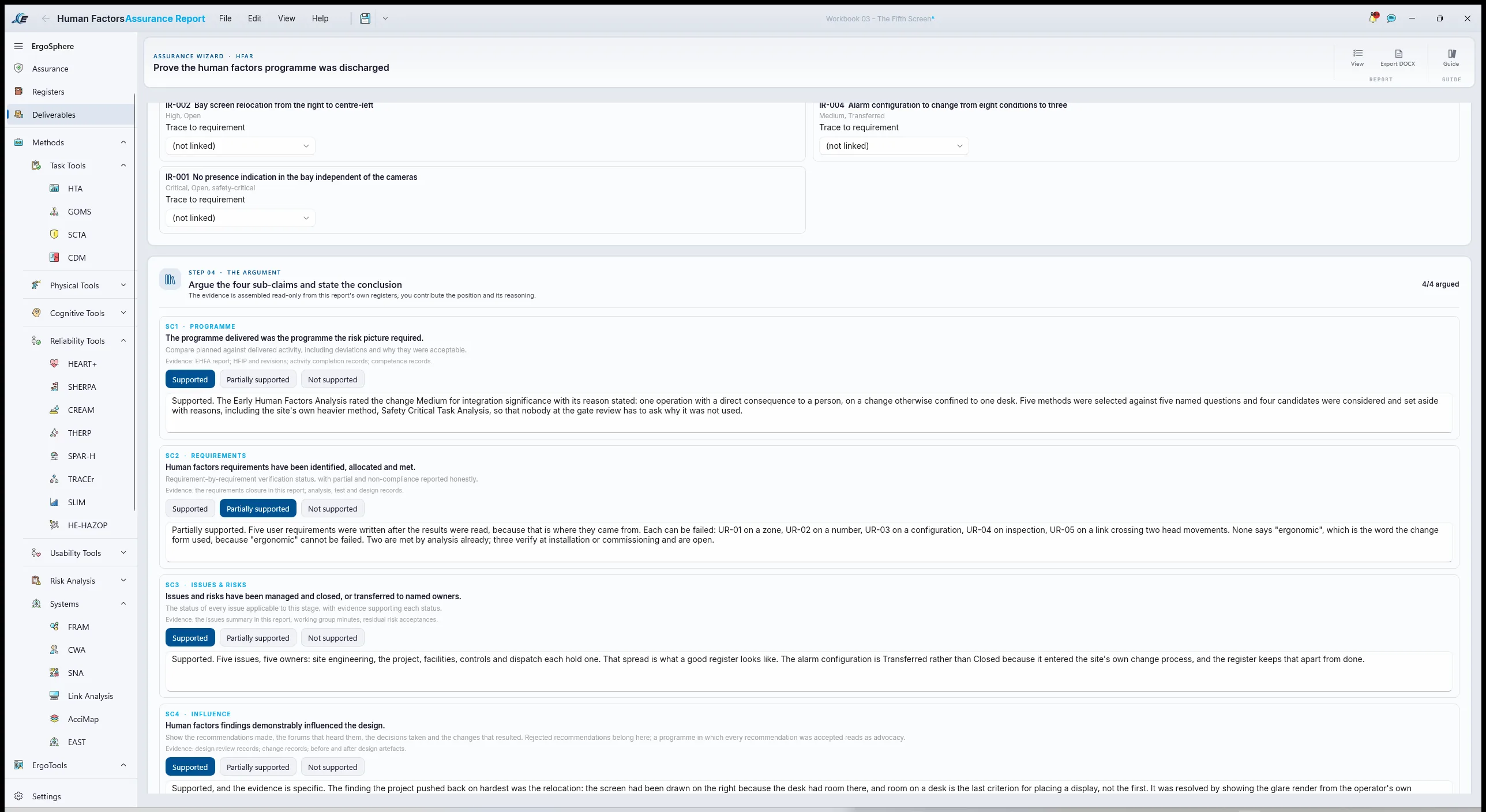
7.4Issued, not emailed
In ErgoSphereReports marked ready, composed into one package, issued as Revision A to the site's engineering manager for the free Viewer. The comment that came back was anchored to the ErgoGlare assessment: the facilities lead wanted to know whether a film on the glazing would do instead of a blind. The model answered it in an afternoon, and the answer was no: the film leaves the Daylight Glare Probability at 1.000, because it dims the background without removing the sun from the view. Revision B carried that result, the blind schedule kept and the film struck out as an alternative rather than recorded as a fallback. Import a Returned Package had filed the comment where it was written, and it was resolved against the revision that answered it.
Common mistakes
What a less experienced practitioner would have done on this job, and what to do instead.
The mistake
Answer the change form as written: assess the monitor, check its height and distance, sign.
Instead
Assess the task the monitor carries. The monitor was fine. The gate release, the alarms and the window were the case.
The mistake
Place the screen where the desk has room, then check it fits the operator.
Instead
Count where attention already goes, then place the screen so its highest-value link is its shortest. Room on the desk is the last criterion.
The mistake
Take a lux reading one afternoon and write "no glare issue observed".
Instead
Model the year. The glare was a winter problem and the survey was in October.
The mistake
Accept the integrator's alarm list because every one of them "could be important".
Instead
Rationalise before configuration. Three of eight needed a person. The other five were noise that would have trained the operator to acknowledge without reading.
The mistake
Write UR-PRO-01 as a procedure, "the operator shall confirm the bay is clear by radio", and stop there.
Instead
Let the error analysis rewrite it. Three high-criticality modes said the procedure would be skipped under exactly the pressure it was written for. Equipment that will not release while the bay is occupied does not get skipped.
The mistake
Leave the Bay Attendant out of the analysis because they never use the system.
Instead
Write them down as a user on day one. The person the system can hurt is its most important user, and the requirement that protects them should carry their name.
Do it yourself
The Revision A deliverable this example ends on is issued below as an ErgoSphere Viewer package. Open it in the free Viewer to compare the link scenarios, turn the room model around and read the glare render. It is built for the scenario and carries no client data.
Captures from ErgoSphere 1.6.2