
The Human Factors Platform
 From Requirement To Issued Deliverable.
One Platform. 54 Tools.
Before the pitch, the product. The method tools organised by discipline, the Ergo originals organised by scope - real windows from the shipping build, nothing mocked up.


The toolkit as it ships: the classic methods organised by discipline, and the Ergo-prefixed originals organised by human, task, environment and system scope. Maturity labels on every tile.
Connected Work.
Disconnected Files.
A Human Factors project can span task analyses, assessment tools, issue registers, requirements and reports. Keeping those records connected takes work of its own.
When the task changes, the analysis needs updating. Findings need to reach the issue register. Requirements need supporting evidence. The report needs to reflect the latest decisions.
ErgoSphere brings those activities into one project file. Assessments connect to the task structure, findings feed the registers, and reports draw on the same project record. Less re-entry, clearer traceability and a more direct path from analysis to issued deliverable.
Recognise the folder? Here is a whole project's worth of it, and the same project as one file →
The usual HF project folder: eight files, each holding part of the story, none of them aware of the others.
Illustrative values. SPAR-H action task: nominal HEP 0.001, and barely adequate available time applies a multiplier of 10.
Your assessments are connected.
Your tools should be too.
54 Tools.
17 Exist Nowhere Else.
The full assessment lifecycle in one working environment: the methods you already trust, and a set of original instruments no other HF&E platform ships. One place, one project file, one report.
Task Analysis
Decompose once. Hierarchies flow forward into reliability and workload assessments without re-keying.
- HTA
- GOMS
- SCTA
- GDTA
Physical Ergonomics
Posture and manual handling, through to the HSE task assessment trio.
- RULA
- REBA
- NIOSH
- Snook
- MAC
- ART
- RAPP
Cognitive Assessment
Workload, attention and situation awareness, captured live in session.
- NASA-TLX
- IWS
- ATWIT
- SWAT
- DRT
- SART
- SAGAT
- CDM
Human Reliability
Canonical event-tree THERP, SHERPA in Classic and Extended modes, and cross-method HEP linking throughout.
- THERP
- SHERPA
- HEART
- CREAM
- SPAR-H
- TRACEr
- SLIM
- HE-HAZOP
Usability & Risk
The usability classics, plus Use-Related Risk Analysis and use-error FMEA for medical and safety-critical devices.
- SUS
- Nielsen Heuristics
- URRA
- uFMEA
Systems
The system around the operator: work-as-done, team and information networks, and causation from the shop floor to the regulator.
- FRAM
- EAST
- SNA
- CWA
- AcciMap
- Link Analysis
Built For ErgoSphere. Available Nowhere Else.
17 original instruments, organised the way the app organises them: by the human, the task, the environment, the system and the direction of the programme. Every name opens a closer look - a screenshot from the shipping build and the full write-up.
Posture scoring from phone video or webcam. No mocap hardware.
Wearable IMU motion capture with live joint-angle dials.
EEG band-power workload analysis.
ACT-R cognitive task modelling.
Time and motion study of workflow patterns.
Monte Carlo HEP simulation across a whole HTA tree.
Before-and-after comparison of HTA and SHERPA across a changing system.
Workstation layout and reach analysis, from 2D draft to 3D.
Radiance-backed glare assessment, interior daylight and exterior solar.
Crowd dynamics for sign placement and egress.
STAMP control structures, CAST and STPA.
System-dynamics causal loop diagrams.
Bowtie barrier mapping, grown into critical control management.
Operator-led alarm requirements, upstream of the master alarm database.
Method selection, assurance and justification, written into the HFIP.
Ten-KPA acceptability radial for AI-based automation.
Five-level safety culture maturity across eleven evidenced dimensions.
From 2D To 3D: Ergonomically Safe Designs
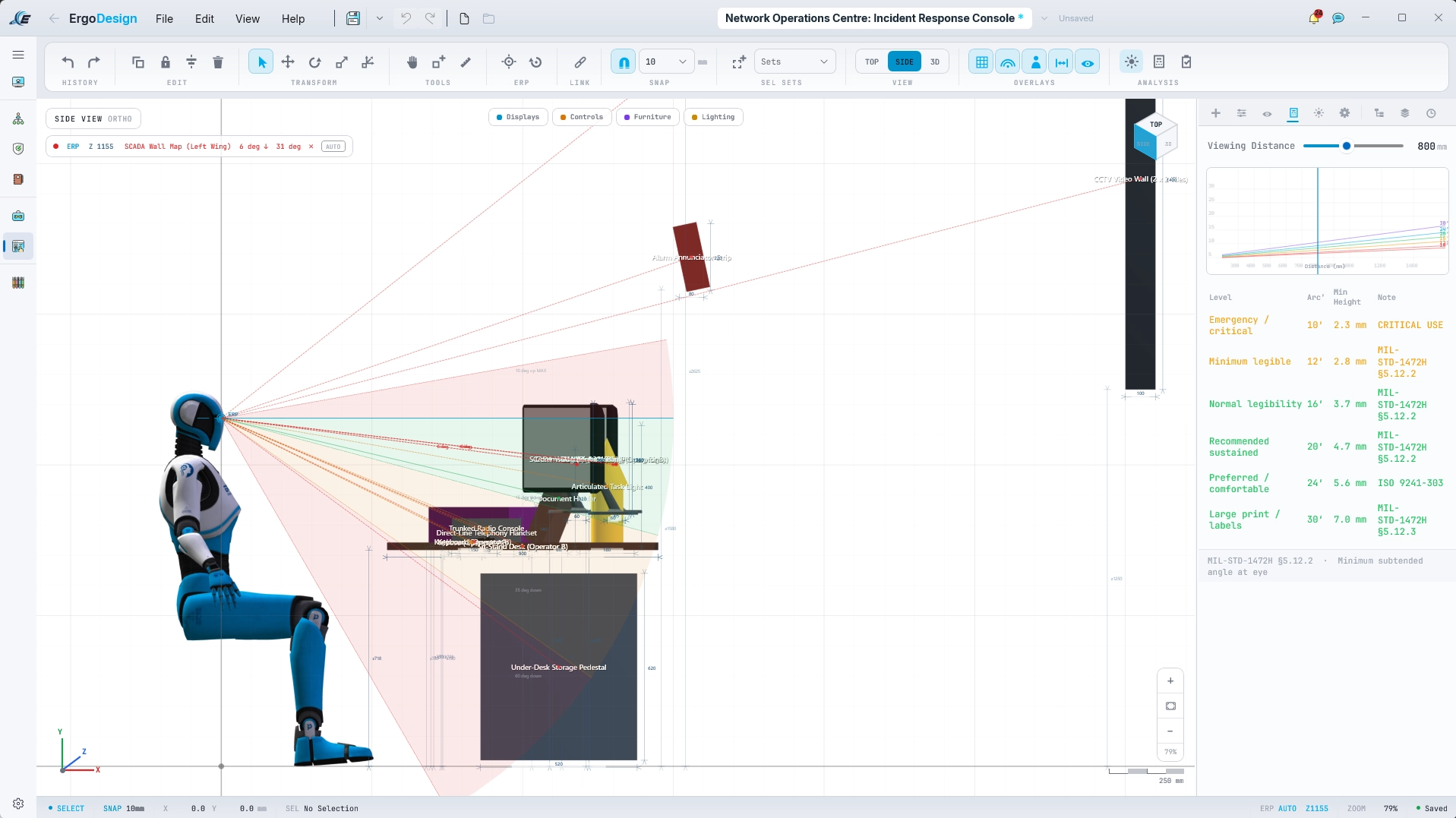
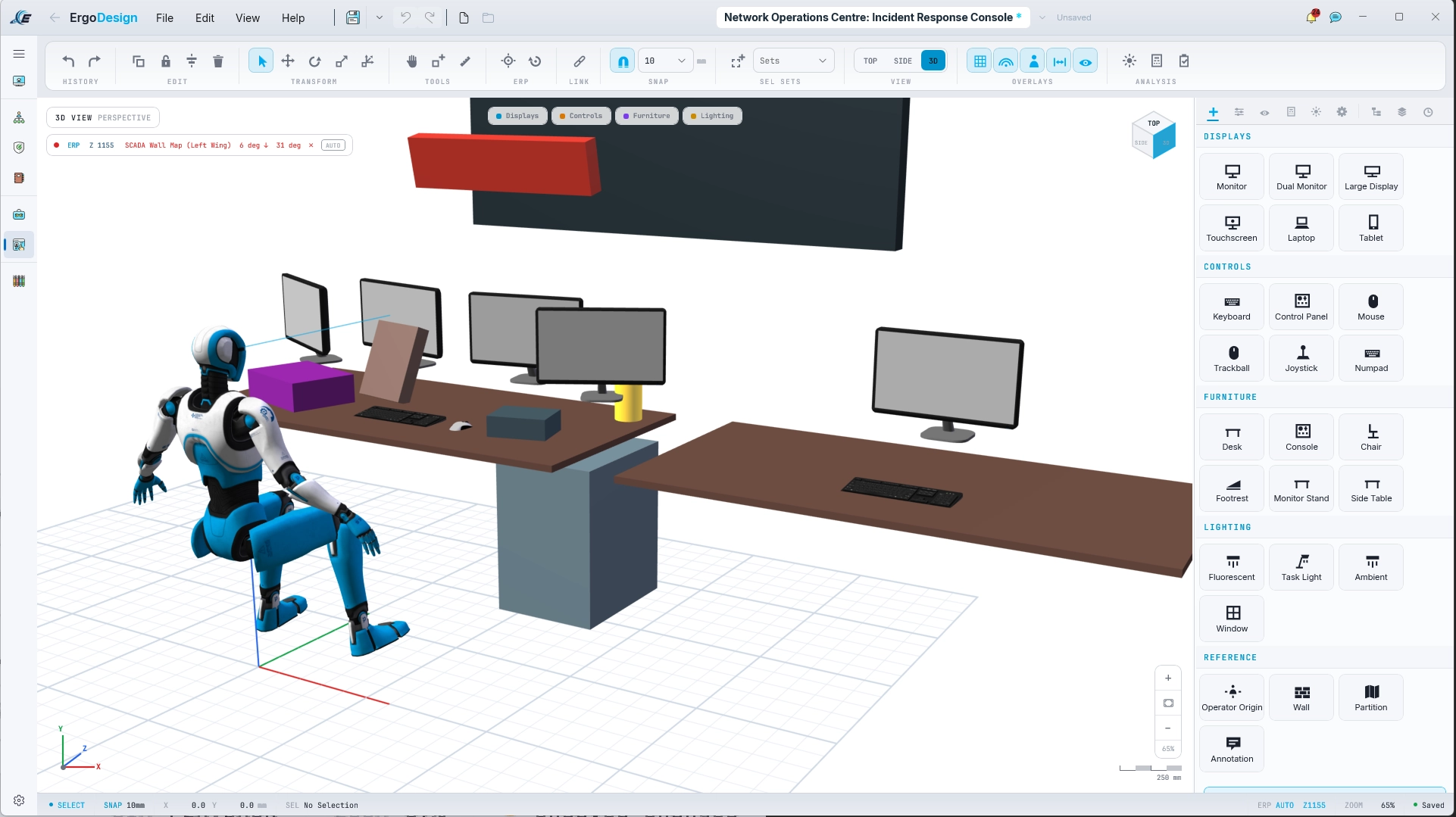
One of the Originals up close: ErgoDesign draws the workstation in 2D elevation - vision envelopes, ERP-referenced dimensions - and keeps a live 3D twin of the same model.
Four of these run free in your browser - no account, no install: RULA, HTA, NASA-TLX and SART →
What Your Client Sees When You Use It.
Your client paid for the analysis and received a PDF. That is how Human Factors usually arrives, and it gets weighed accordingly: the deliverable shapes how seriously the discipline is taken. These are screens from working assessments in the shipping build - the difference between submitting findings and presenting a practice. Click any screen to look closer.
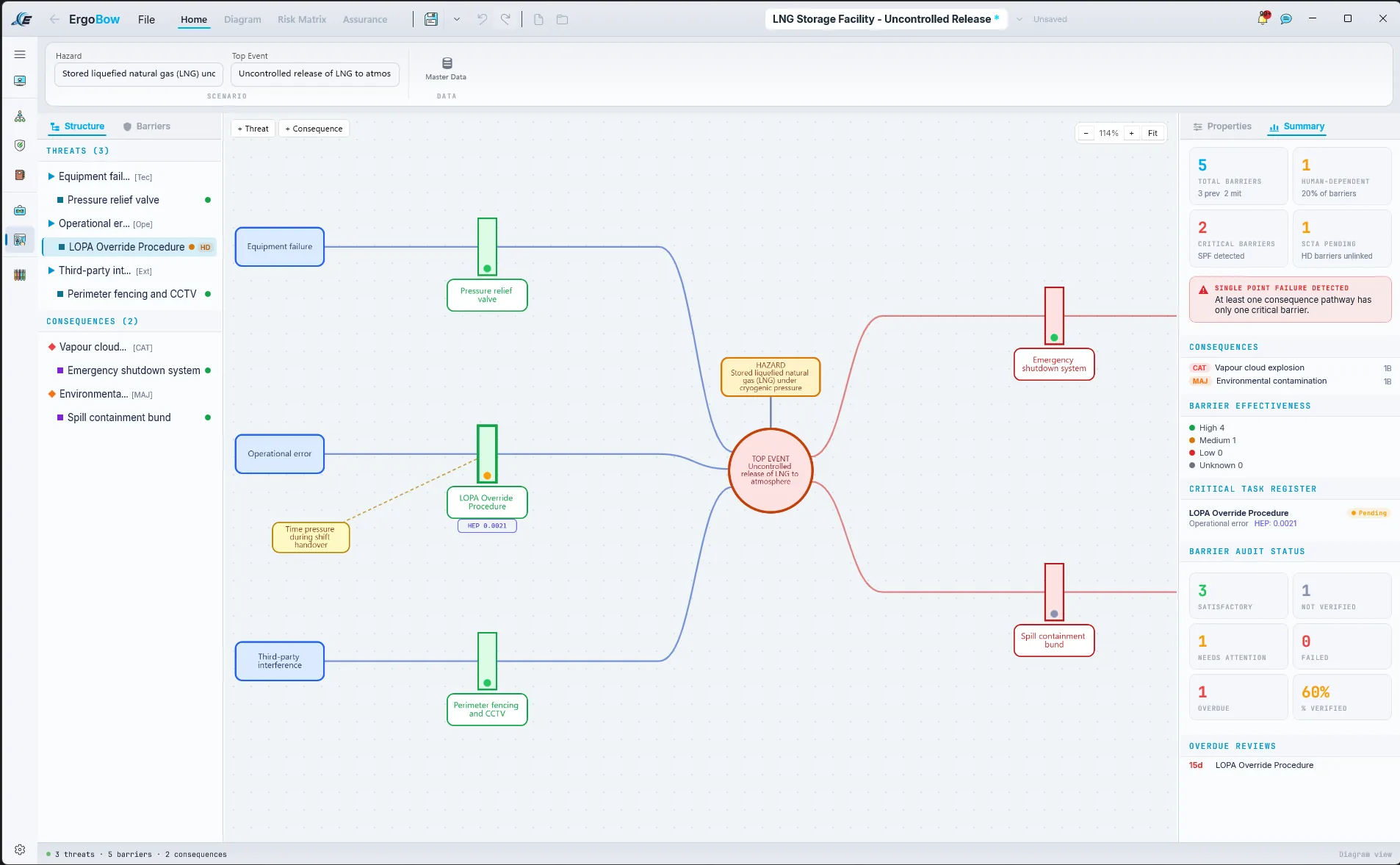
A live bowtie for an LNG storage facility: threats, barriers and consequences, human-dependent barriers flagged, and a single point of failure caught before an auditor catches it.
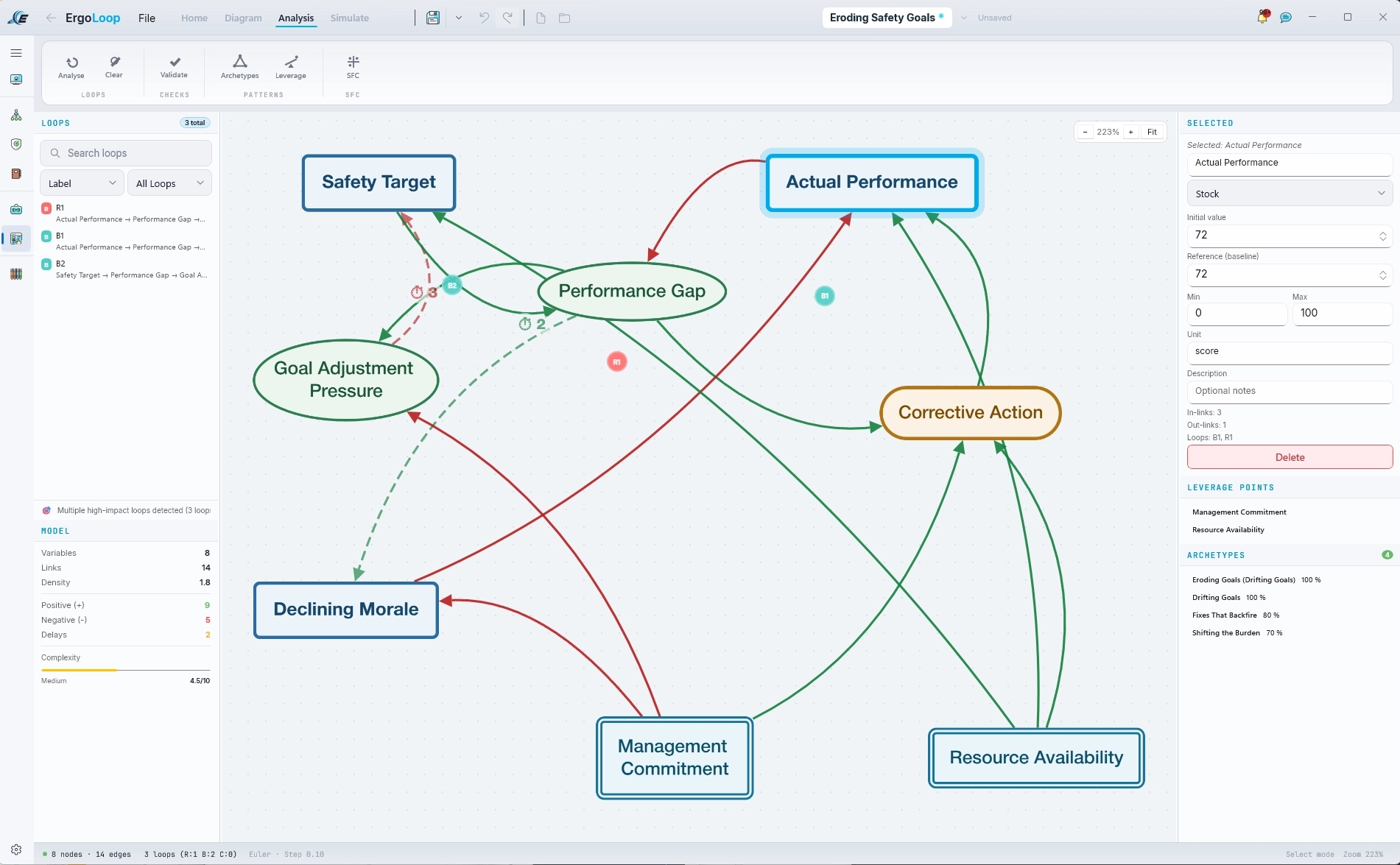
System-dynamics modelling that recognises archetypes as you draw: this safety-goals model matches Eroding Goals at 100 percent, with leverage points a click away.
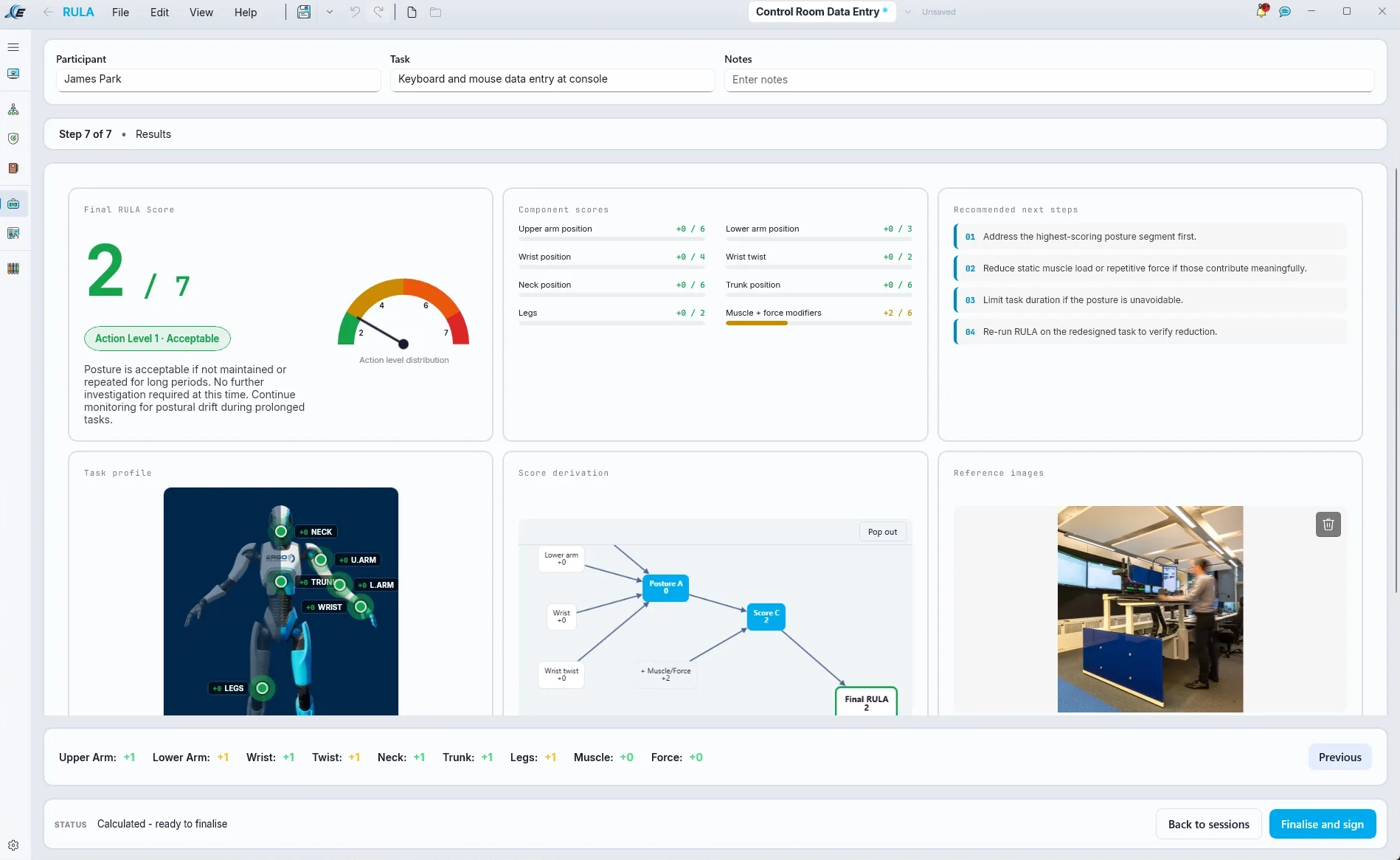
A finished RULA assessment: component scores, action-level gauge and recommended next steps, ready to finalise and sign.
What You Hand The Client
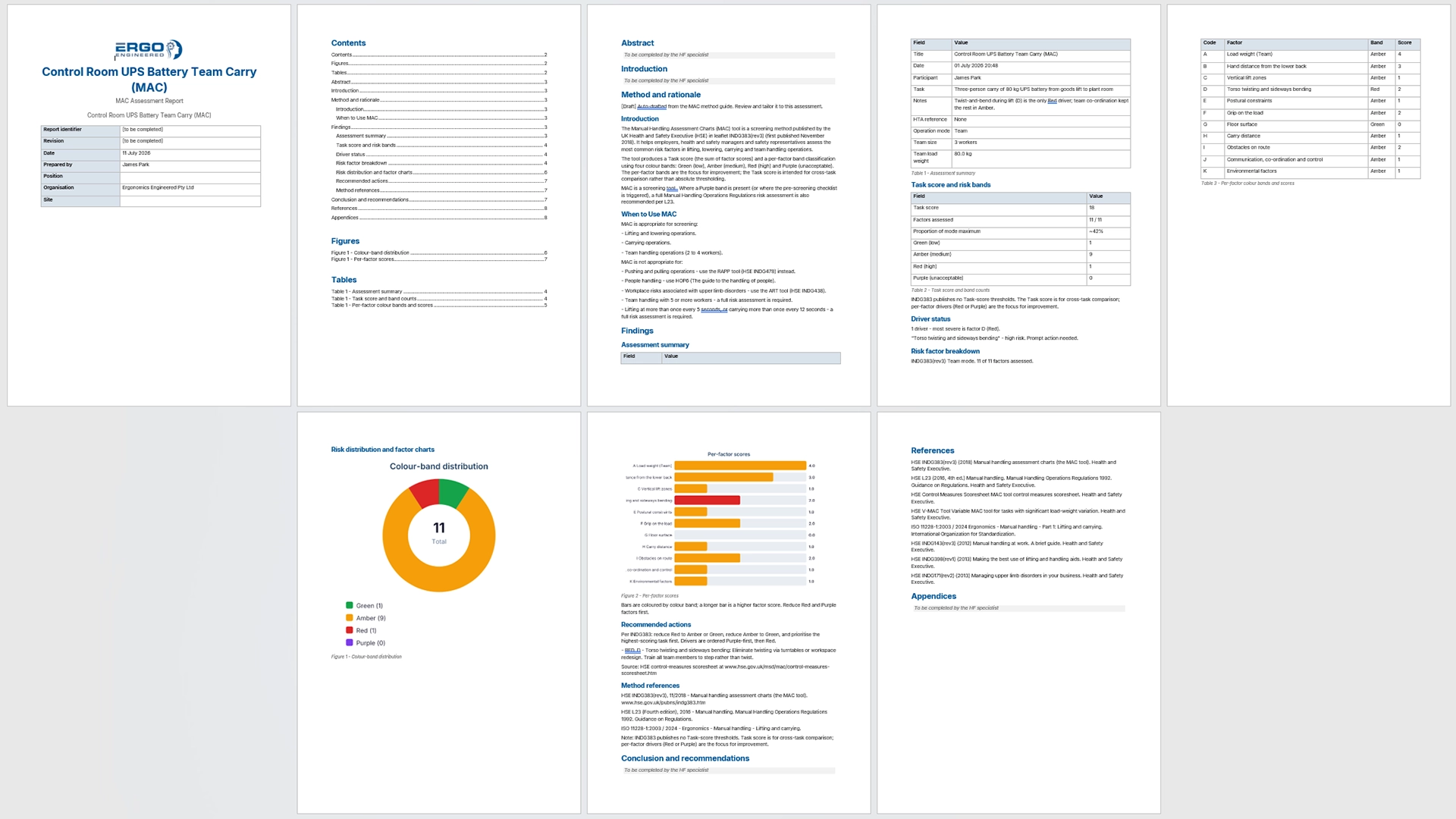
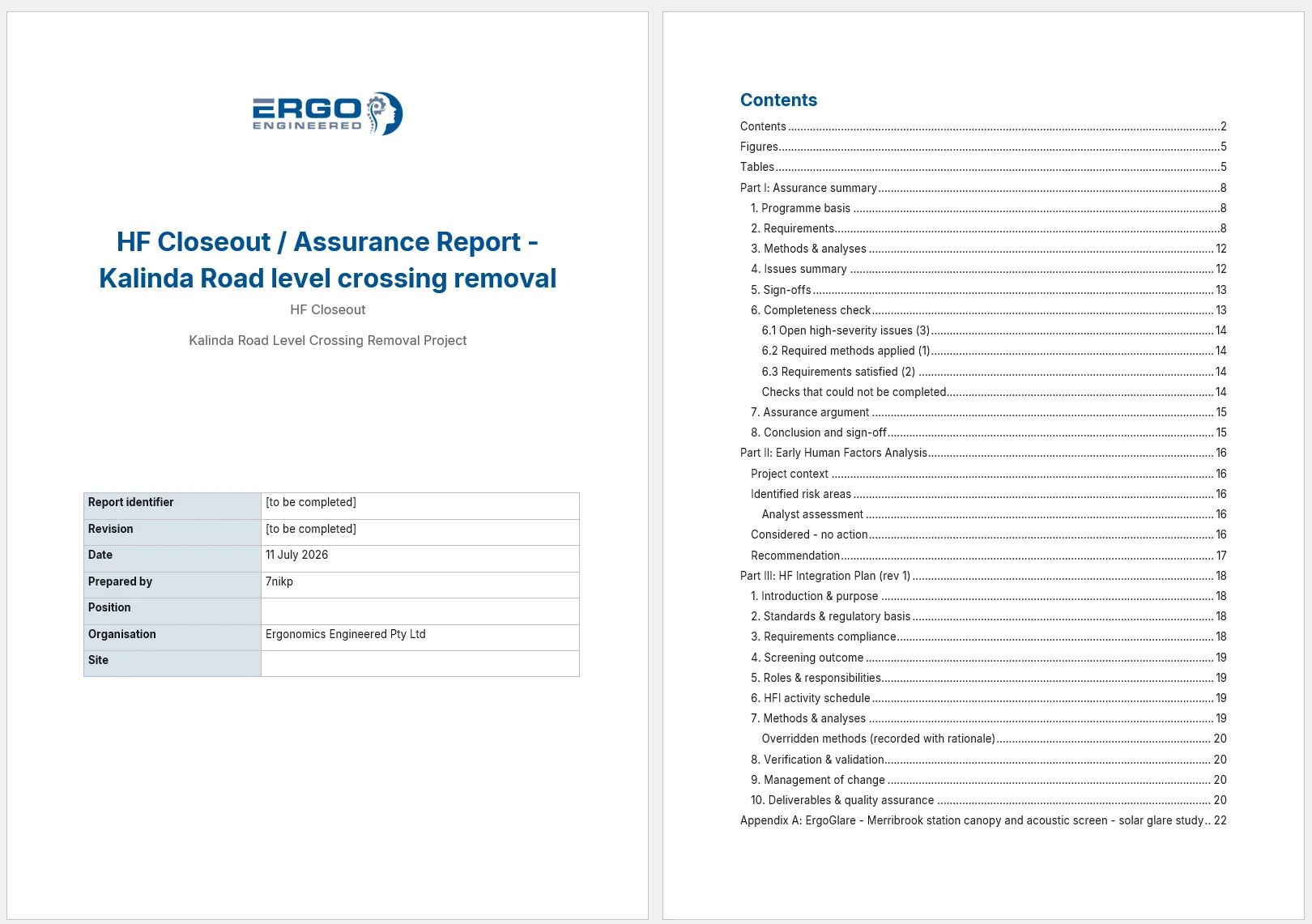
Generated, not assembled. The full spread is one tool's session report - a MAC assessment with method and rationale, findings, charts and references, auto-drafted by the tool and finished by the assessor. Click either document to read it.
Take the Word Document Anywhere. Or Issue Something Better.
A report you cannot take away is work you do not own. Every report leaves ErgoSphere whenever you say so - the only question is which door it takes. Neither one is a flat PDF.
Pull out the Word document
Every assessment drafts its own report, and the close-out compiles the programme. One click hands you a native Word document: your template, your letterhead, your edits. Walk away with it whenever you like - nothing about your own work is locked in.
Issue a controlled deliverable
Or stay in ErgoSphere and issue it: a revision-lettered package, hash-sealed, carried with a contents manifest that declares what went in and what was left out. Your client opens it in the free Viewer and meets the living analysis - interactive charts, finalised assessments, the numbers behind every score. Not a flat print of the work. The work.
The delivery loop, as the Deliverables module runs it. A Ready mark lapses the moment the report changes underneath it, so nothing stale can ship. Issue takes Rev A out the door as a sealed package. And the amber leg is the part paper cannot do: the client's comments come back into your review queue, anchored to the exact finding, ready for Rev B to answer.
ErgoSphere Viewer · Free
Your client does not need ErgoSphere to open any of this. Deliver the assessment as a .ergview file and they can walk the task analysis, trace the bowtie and read the numbers behind every score in the free Viewer. Read-only, no licence, no account - and their review comments travel back to you in the same file.
Beyond the Assessment. A Full Programme Backbone.
Four first-class modules sit alongside the assessment tools. The work doesn't stop at a score - it flows into a project, a register, a compliance gate, and out the door as a controlled deliverable.
Project Management
Run the HF programme, not just the assessment.
- Progress & Risk Analytics dashboards
- Gantt-style scheduling
- Team management & role-based access
- Multi-format reporting (DOCX, HTML, Excel)
- Data Explorer across all assessments
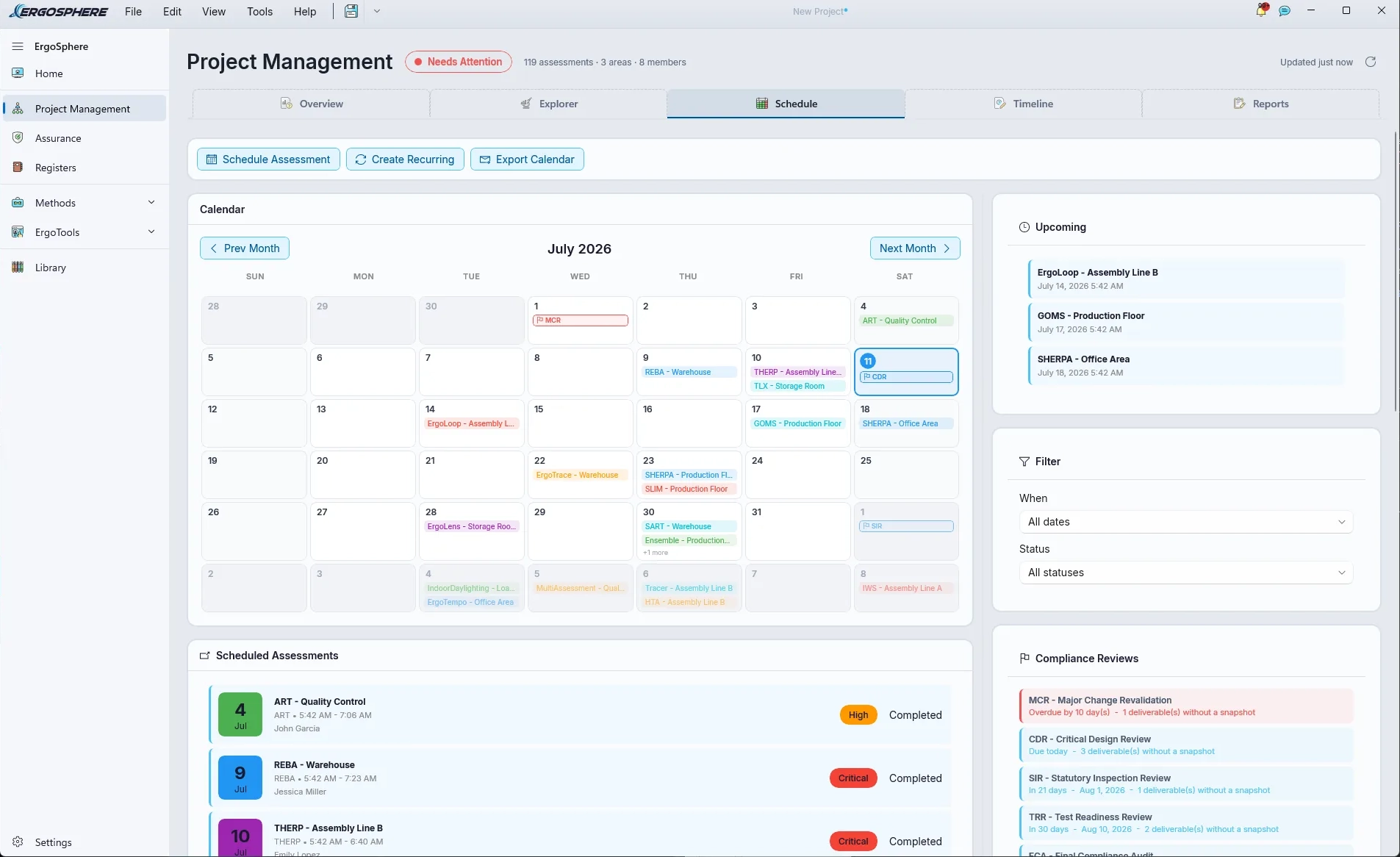
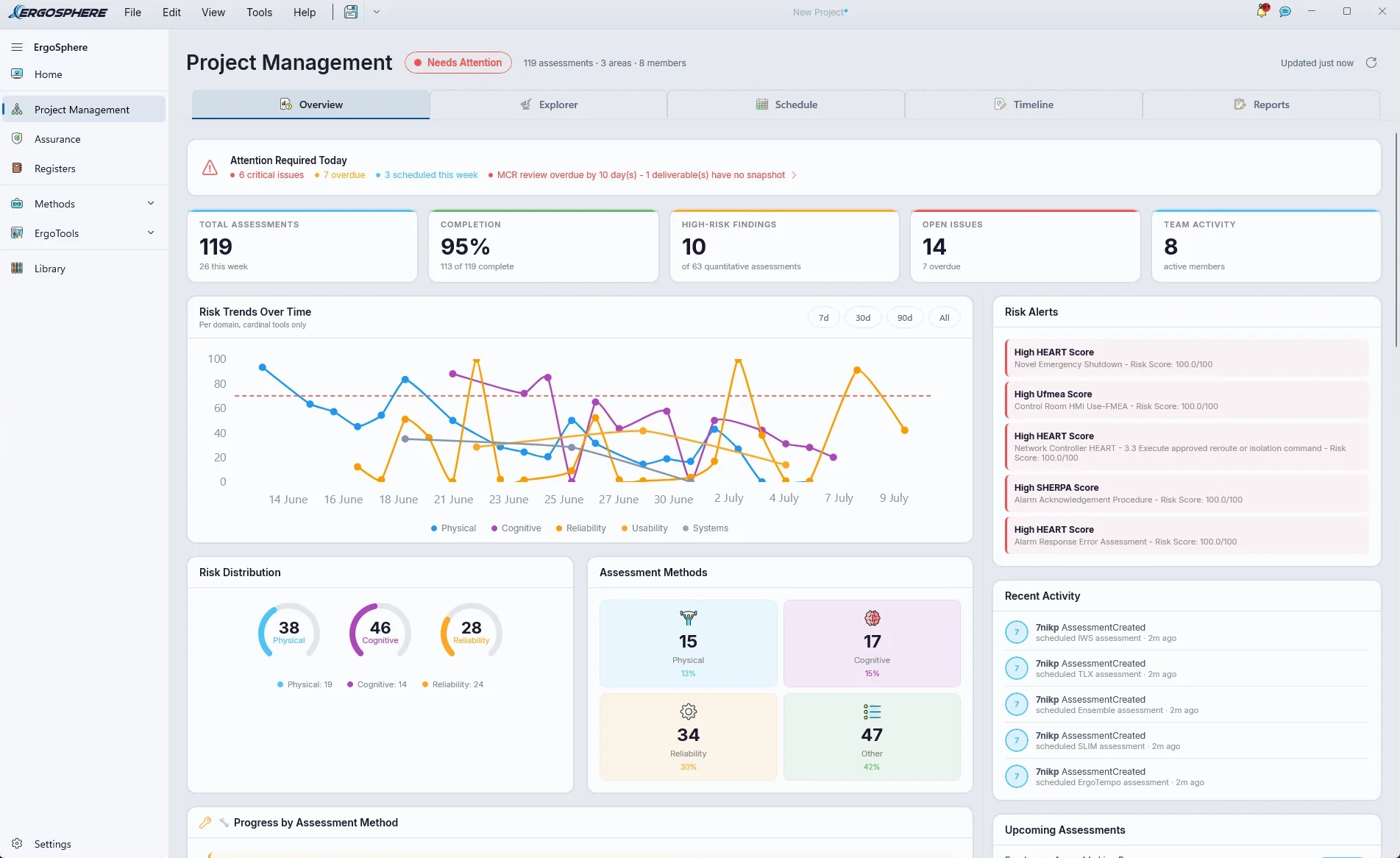
A programme of 119 assessments on one calendar: scheduling with recurring assessments and compliance review gates, and progress, risk and activity analytics over the lot.
Assurance
Gate-review ready. Audit-ready. Out of the box.
- Standards Register with applicability matrix
- Assurance Dashboard
- Gate Review workflow
- Evidence Timeline (chain-of-custody)
- Hash-based integrity snapshots
- EHFA, HFIP & compiled close-out reports
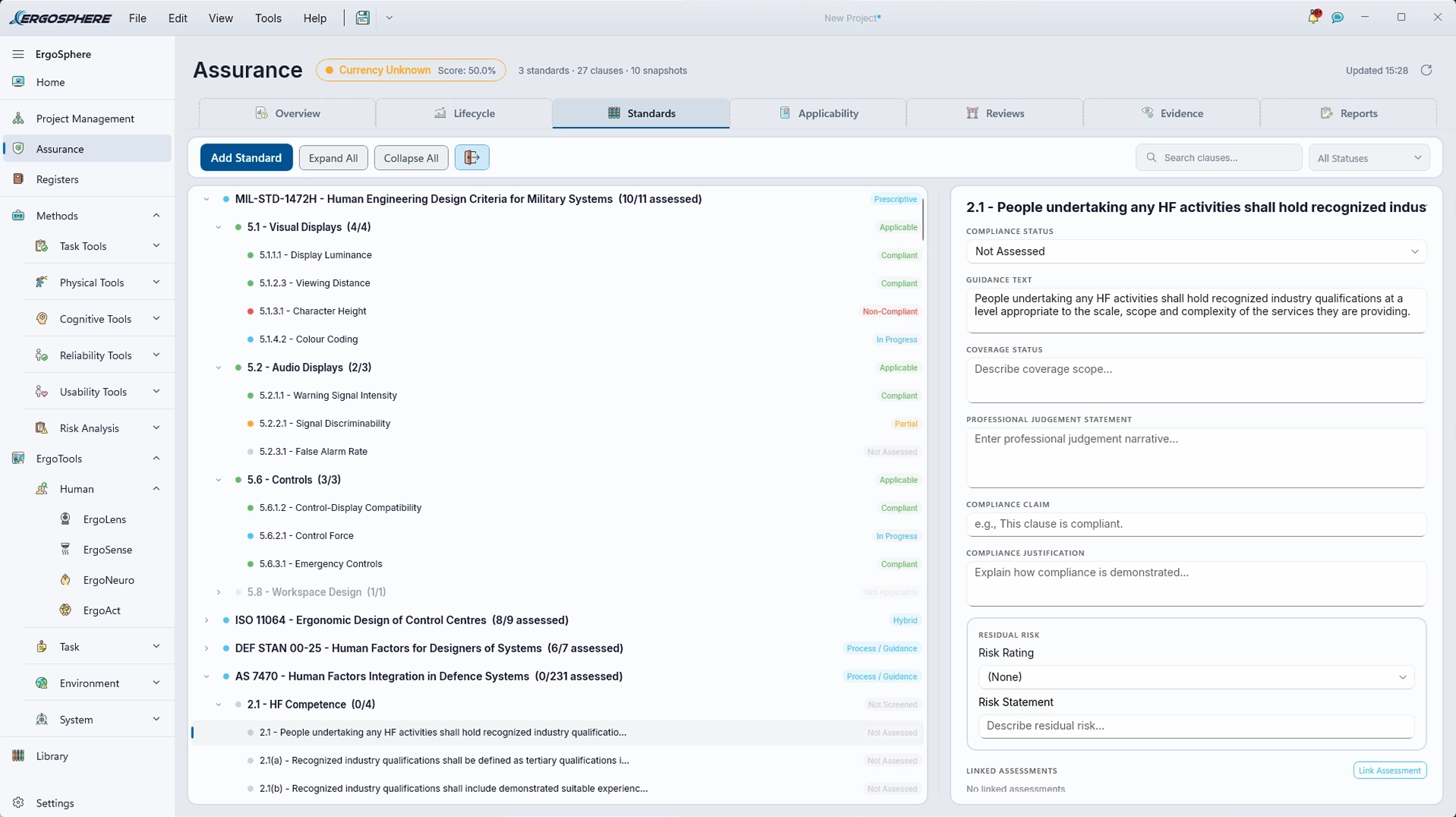
Standards, clause by clause. MIL-STD-1472H, AS 7470, ISO 11228 and ISO 26800 ship in the library, and any other standard, like the ISO 11064 and DEF STAN 00-25 sets on screen, is added by hand, section by section. Each clause carries its compliance status, professional judgement, residual risk and linked assessment evidence for requirement tracing.
Registers
Every issue, task, role, document and standard in one place.
- Issues Register (HF findings & actions)
- Task Register (work-item allocation)
- Role Register (positions, never people)
- Role coverage of the Task Register, by mode of operation
- Difficulty & frequency ratings - the DIF triple, for a Training Needs Analysis
- Document Register
- Standards Register
- MAH Register (major accident hazards)
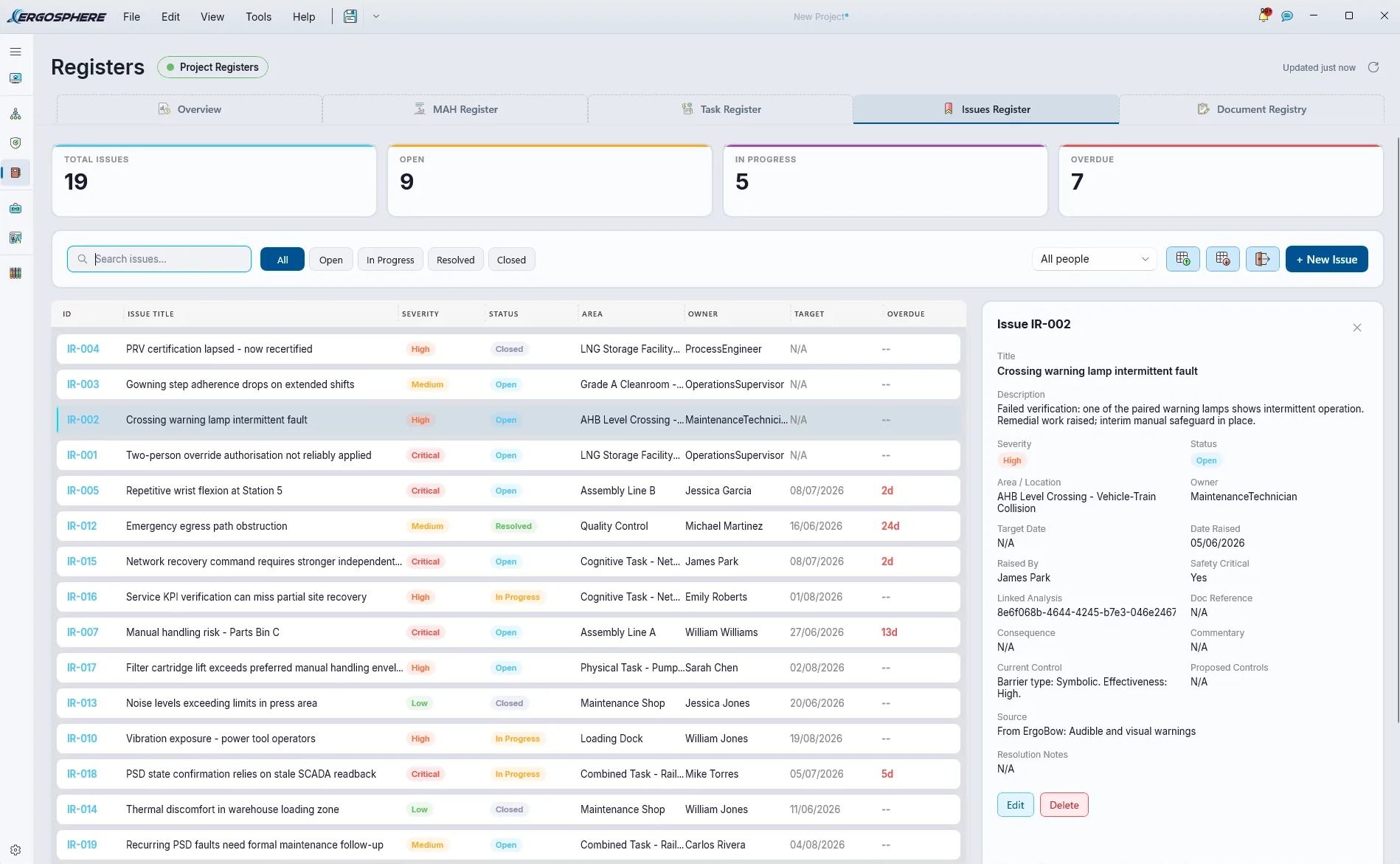
Findings become records. An issue raised in ErgoBow lands in the Issues Register with severity, owner, target date and overdue state - and the Issues and Standards registers export to ReqIF for IBM DOORS and other requirements tools. HF findings, flowing into the systems your engineering programme already runs on.
Deliverables
Assurance decides the work is right. Deliverables decides what leaves the building.
- One register across every report: analysis, assurance, extracts
- Ready marks that lapse if the content changes underneath
- Revision-lettered packages: Rev A, Rev B, sealed & manifested
- Issued as an interactive .ergview for the free Viewer
- Client review import: comments anchored to the exact finding
Delivery, run like a register. Every report's state on one rail, what is ready to issue, what is blocking the next issue, and the client's returned review waiting for an answer - with every issued revision's manifest and digest on record.
One Project. One Evidence Trail. One Report.
Every tool in ErgoSphere shares the same project file. Every assessment writes to the same evidence model. Every output flows into one auditable report. The integration is the point.
One Project File
Every tool reads and writes the same project. No exports. No copy-paste between applications. No stitching reports together the night before a deadline.
One Evidence Trail
Hash-based integrity snapshots across assessments help you check whether recorded content has changed. Keep the supporting evidence together for assurance reviews and reporting.
One Report
A single auditable report assembled from every tool used. The assessor's narrative, the methodology trace, and the evidence - in one professional deliverable.
Every assessment hangs off the task it scores.
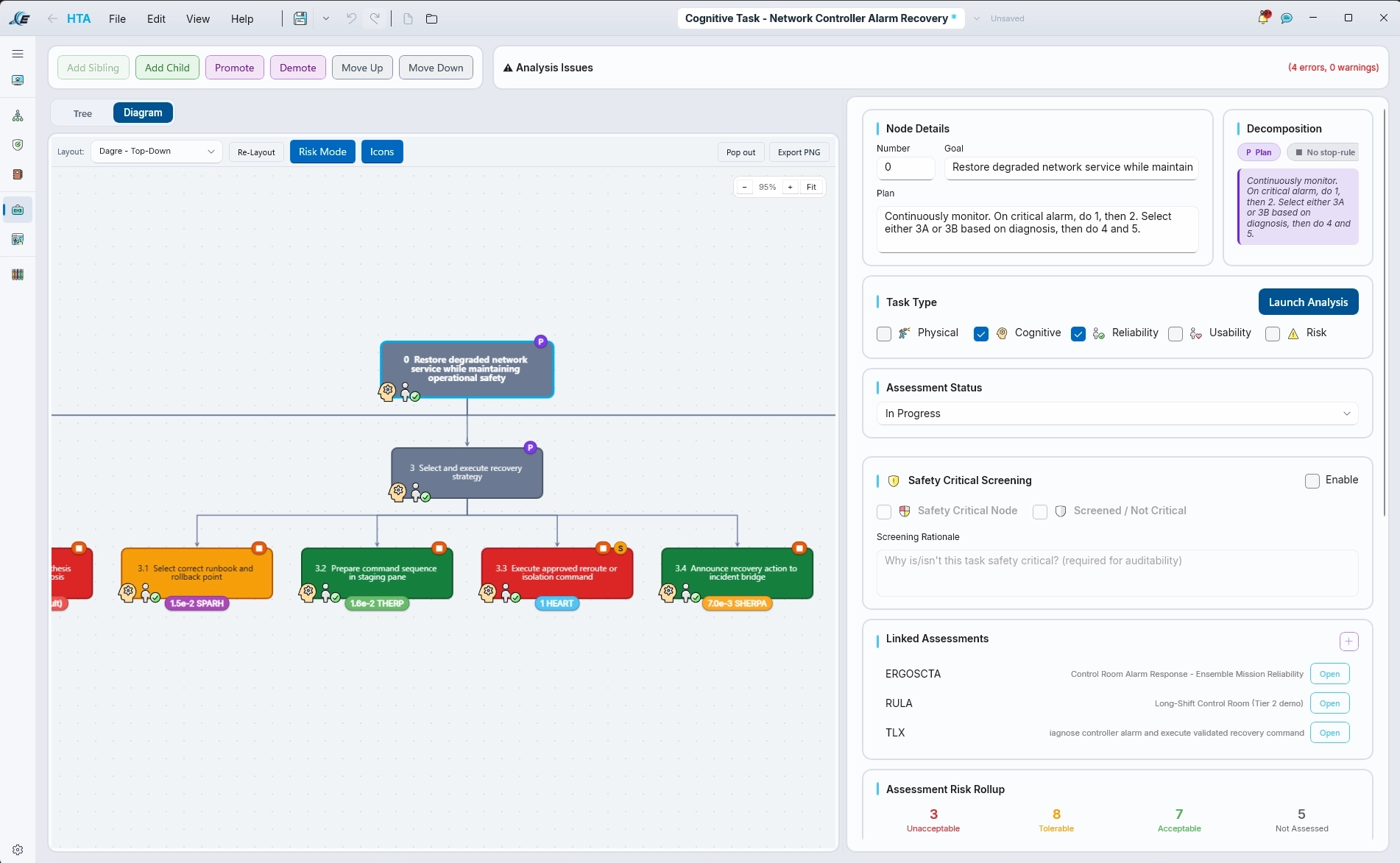
The integration, on screen. One HTA carrying live HEP results from SPAR-H, THERP, HEART and SHERPA on the task tree itself, with every linked assessment one click away and risk rolled up across the hierarchy. No re-keying. No stitching.
Change one word. The seal notices.
Every issued package carries a SHA-256 fingerprint of each thing sealed inside it, and one digest over the lot. The Viewer checks them as the package opens.
Try it: open any entry and change something, and its fingerprint moves. Put it back and it verifies again, because the seal checks content, not history. Add a review comment and nothing breaks: comments sit beside the sealed content, never inside it.
- Package manifest
-
Severity
-
Stop rule
-
Action task · available time PSF
Available time
-
Ready mark
Integrity only: the seal shows whether anything has changed since issue, by accident or casually. It does not prove who produced the package, because anyone editing the file can recompute it.
Wearable Capture. Scored Frame By Frame.
ErgoSense streams wearable motion capture into the same project file as every other tool. Scrub the take frame by frame with joint-angle dials for neck, trunk and shoulders, keep the synced operator webcam alongside, and score RULA, REBA and NIOSH from the one recording.
See something worth acting on? Log a finding at the exact frame, and it carries through to the report with the evidence attached. Walking a client through their own operator's capture is a different conversation to handing over a workbook.
Book a live capture demo →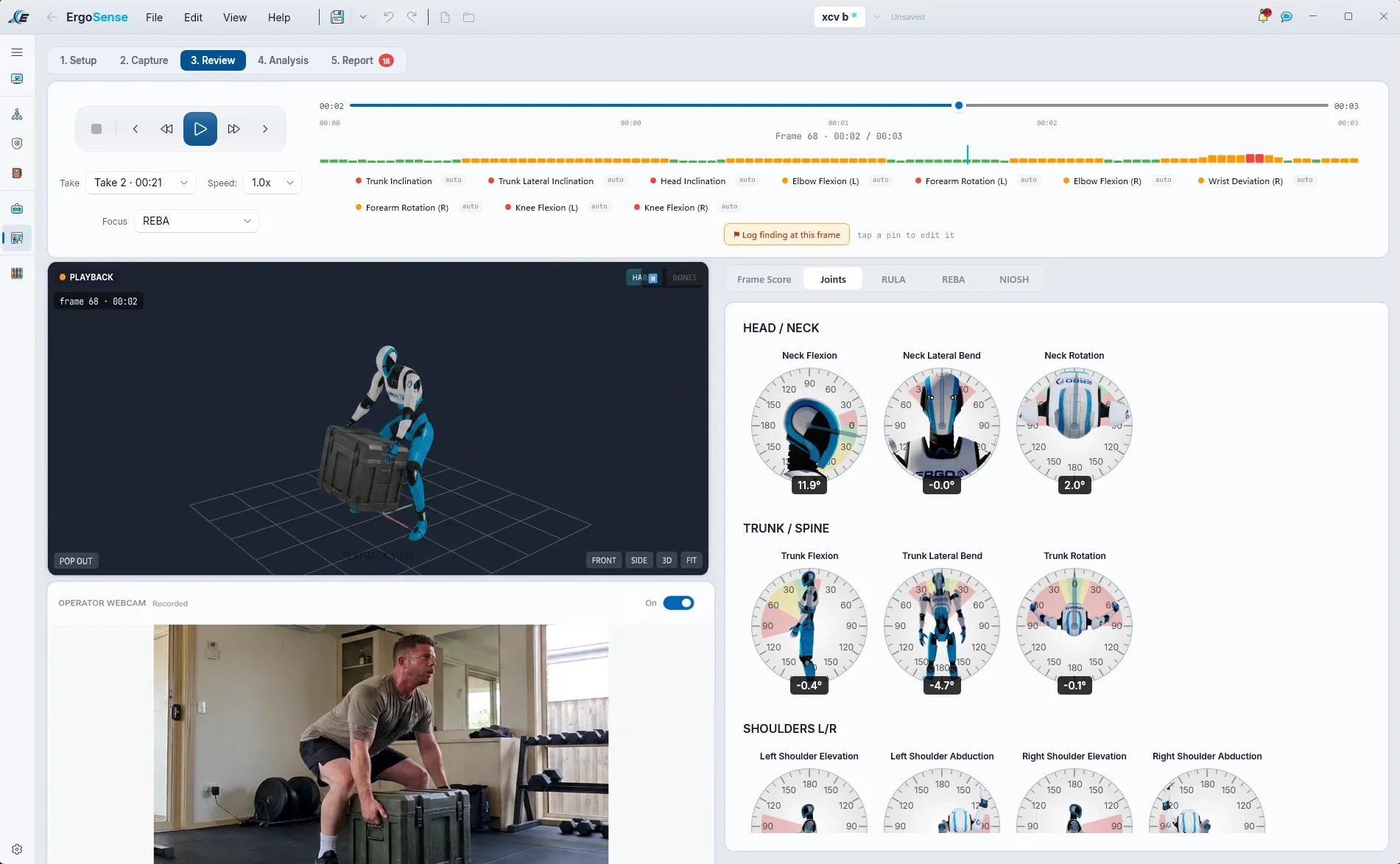
Watch the score move. Then fix the lift.
A carton, a low table, a high shelf. Every frame is scored with REBA from the skeleton's own joint angles and painted onto the timeline, with the worst one flagged as a finding. The lift itself runs through the NIOSH lifting equation, origin to destination. Then raise the table, or change the weight, and watch it all re-plan.
REBA, this frame
Score A 1 · Score B 1
- Trunk0°1
- Neck0°1
- Knees0°1
- Upper arm0°1
- Elbow0°1
- Loadnone+0
- L5/S1 loadlow●
A teaching model of what ErgoSense does with captured 3D kinematics: one side view, no twist or side bend, wrist taken as neutral, fair coupling while the carton is held, activity score 0, NIOSH load constant 23 kg. The floating L5/S1 dial is indicative only: its needle follows a simplified estimate of load on the lower back, on the same face as ErgoSense's gauge, with the NIOSH action limit at 12 o'clock. ErgoSense calculates the real figure from the subject's body weight, height and captured motion. Scored against the published REBA tables (Hignett & McAtamney, 2000) and the revised NIOSH lifting equation (Waters et al., 1993), taking 2 lifts a minute for up to an hour, fair coupling and no twist.
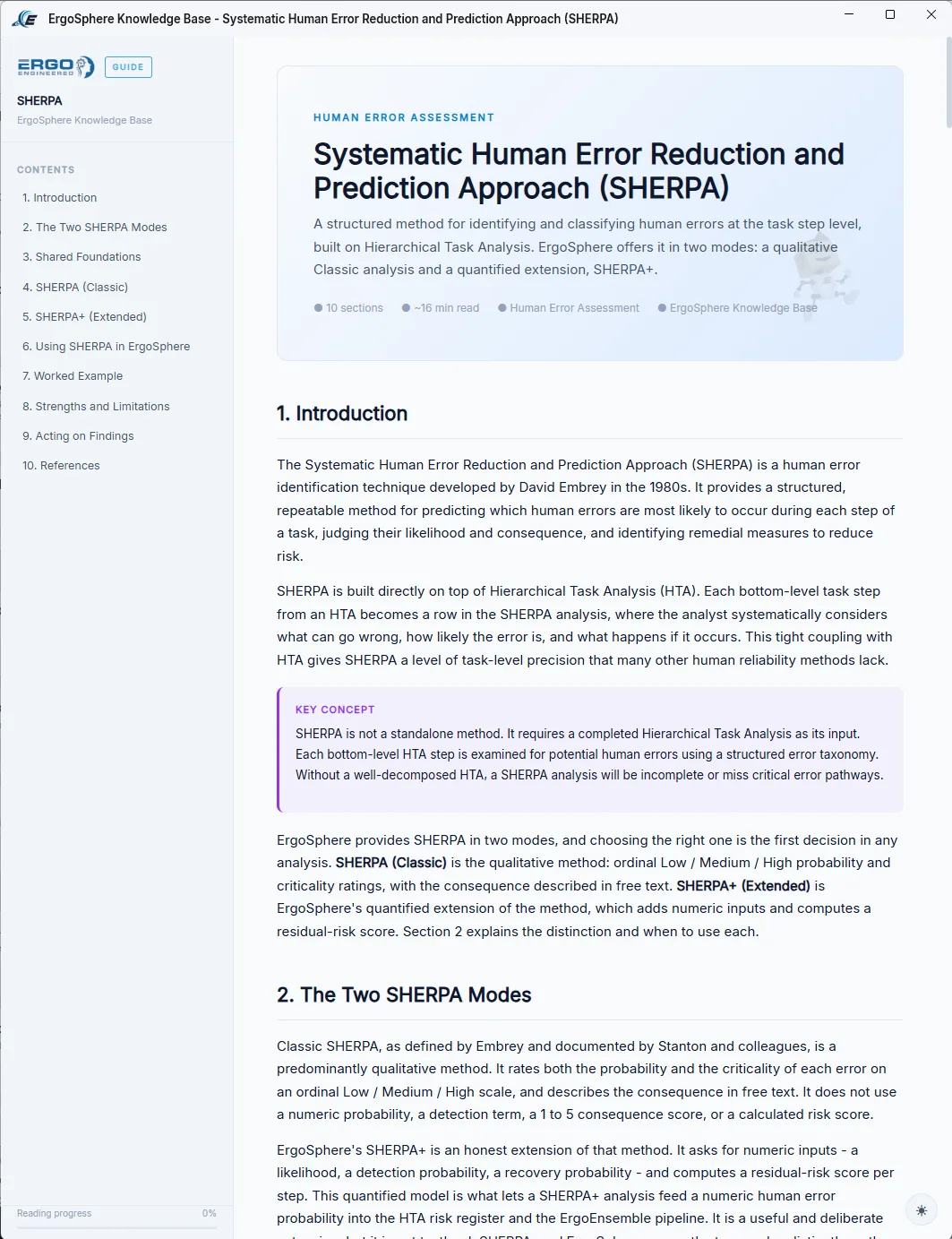
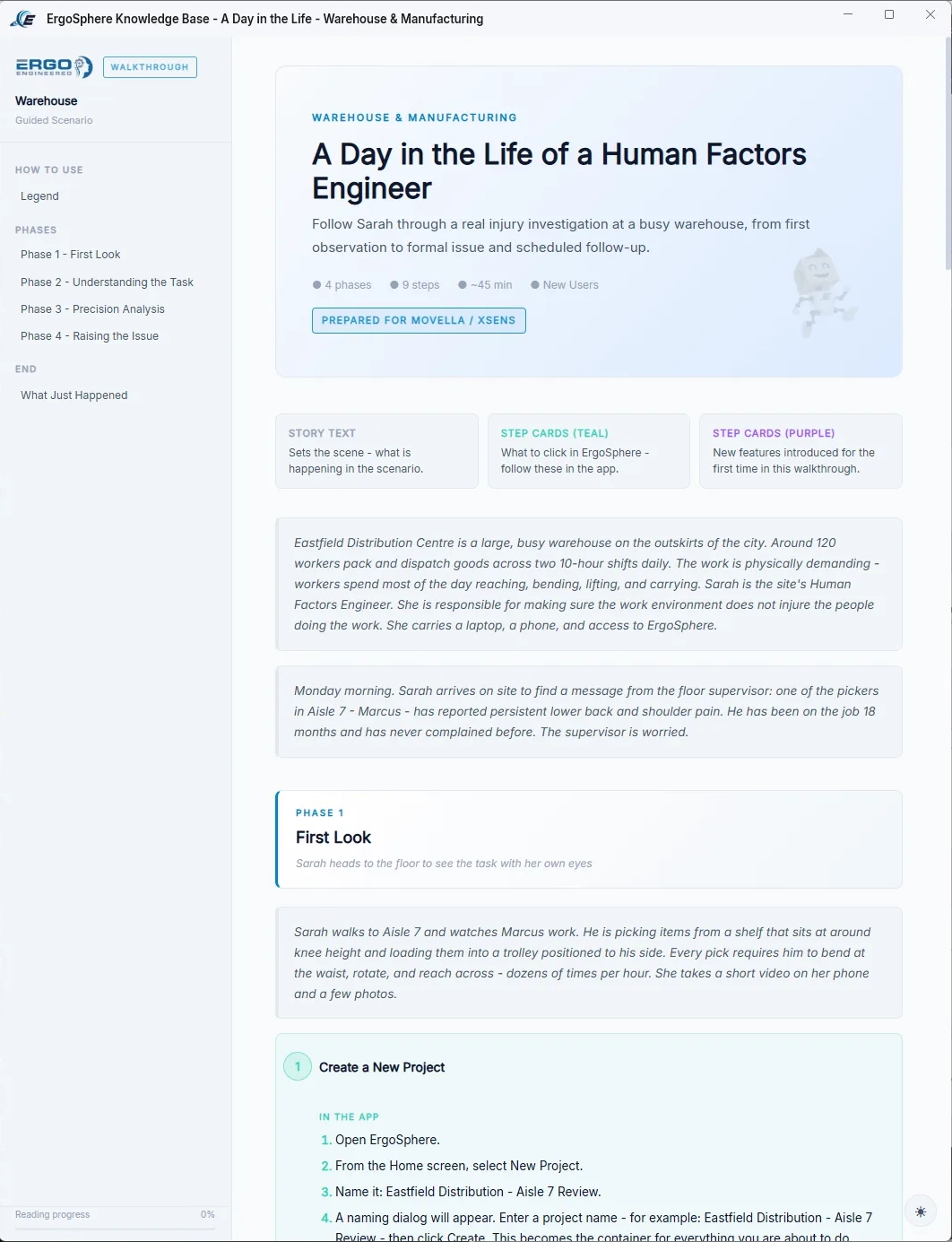
Every Method, Taught In-App.
The Knowledge Base ships a full write-up for every method: what it is, where it came from, when to use it, how to run it in the tool, a worked example, honest strengths and limitations, and the source literature - linked. 54 tools stop being intimidating when the theory travels with them.
New to the platform? Guided scenarios walk you through real investigations end to end - like a day in the life of an HF engineer chasing a warehouse injury report from first observation to formal issue and follow-up.
Want to see the methods applied before you open the app? The Workbook walks whole assessments end to end →
Free for students and universities →Built for the Buyer Who Has to Vet You
Affordable for the practitioner. Credible for the procurement officer who has to approve the purchase. Both, by design.
EV Code Signing
DigiCert Extended Validation. Every release signed. The trust mark procurement asks for.
Local-First
Customer data lives on the customer's machine. Not in a vendor cloud. Not on someone else's server.
Zero-Knowledge
Client-side encryption. The vendor cannot read your data, cannot recover lost passwords, cannot be compelled to disclose.
Documented Engineering
A full System Architecture Document and a Security & Data Privacy whitepaper, available to your IT department on request. Engineering your reviewers can interrogate, not an app thrown together to ride a wave.
Documented Verification
Our verification programme records how assessment methods are checked against their published sources. Read how the checks work and explore the public engineering record. Detailed dossiers are available on request under NDA; the verification page explains the programme's scope and independent review status.
Australian-Engineered
Brisbane-built. Independent. Veteran-owned. Designed and built by a certified Human Factors engineer (CHFEP) and former Boeing Associate Technical Fellow, with three invention awards and two published patents on the record, to Australian privacy and software standards from day one.
Built for a decade before it had a name.
ErgoSphere is the consolidation of ten years of purpose-built human factors tools: each written for a real problem, in whatever language suited it at the time. They worked, they scattered, and this platform is where they finally live together. Built by one person carrying three trades: a graphic artist's eye for the face, a coder's hands for the tools, and a systems engineer's discipline for making it all mesh. Read how ErgoSphere got its name.
Gravity and force simulators acting on the human body
Joint angles pulled from captured postures, static and moving
Cognitive models grounded in Hierarchical Task Analysis
Evacuation simulation, waypoint signage, accident reconstruction
That work, brought into one codebase. Windows native, local-first, shipping.
Honest About Today. A Maturity Ladder You Can See.
A solo-built platform that claimed every one of its tools was best-in-class would be lying. Some tools are mature and battle-tested. Some are early. ErgoSphere ships with labels on every tool so a practitioner always knows what they are standing on.
Revenue funds the team. The team takes the tools to best-in-class, one at a time. The Preview and Beta labels graduate as each tool matures.
Graduations are not quiet. Every label change, new method and fix is in the release notes →
Established Core
Tools with practical use and technical review behind them. Apply each method within its documented scope and limitations.
Functional, Hardening
Complete and usable. Still being polished against in-field feedback before it graduates.
Early Access
Live in the toolkit so practitioners can shape it. Treat as preview while methodology is finalised.
The labels live on the tiles. Every tool declares where it stands before you open it.
One price, plainly stated. And a year on us for the people building Human Factors from the ground up.
One annual licence. The full platform. Buy a seat at the published price, apply to the Founding Cohort for 25% off your first two years, or be selected as a Champion and spend a year on us. Same software, whichever way in.
The full platform at the published rate, no strings. The same price whether you buy direct in Australia or through one of our partners overseas.
Don’t sell it. Show it.
Most organisations have one person carrying Human Factors. I’ve been that person. Too many good practitioners spend more time justifying their tools than using them. So here’s my offer: use ErgoSphere on your real work for a year. I’ll help you get started, check in each quarter, and build what you tell me is missing. If it earns its place, keep it. If it doesn’t, we part as colleagues.
Nik Pearsall, CHFEPFounder
Let’s talk- M01Onboarded. First live project opened.
- M03First assessment delivered, end to end.
- M06Findings logged, tracked, closed out.
- M09Reports issued. Wins on the record.
- M12A year of your own work on the table. That is your business case.
- Set you up and help you run your first live project
- Be a phone call away when you’re stuck
- Build what you tell me is missing
- Help you make the case to your leadership
- Connect you with Champions in other industries
- Put it to work on a live project in the first three months
- A short, honest conversation each quarter
- Share what changed at year end, named or anonymised
- All 54 tools - the 37 methods you know and the 17 ErgoSphere Originals
- Windows 10/11 native desktop app - all work stays local, no server to stand up, no cloud dependency
- Method guides built in - what each method is, when to use it, how to run it, and the source literature
- Project Management, Assurance, Registers & Deliverables modules
- The free ErgoSphere Viewer for your clients - deliver interactive .ergview files they can open without a seat
- Every update while your licence is active
- Local-first and zero-knowledge, your data is never held hostage
- No per-module pricing or function-by-function upsell
- No "contact sales" wall and no procurement-only gate
- No surprise annual review cycles
- No price change for founding seats inside the two-year window
Need to justify the spend internally? Here is the case, with the arithmetic already done →
ErgoSphere through a partner
Outside Australia, ErgoSphere is delivered through a small number of accredited regional partners on private wholesale terms. We do not publish partner pricing here. If you advise on or implement Human Factors and ergonomics work in your region and want to carry ErgoSphere, become a partner and we will talk numbers directly.
ErgoSphere for Education
Free platform licences for universities and training providers that embed ErgoSphere into accredited Human Factors coursework. Students learn on the same toolset they'll use in practice. The instructor applies; licences are issued for the whole cohort and renew each teaching period.
Enquire about an educational licence → Studying rather than teaching? Get your own free licence →Buying for a team?
Every seat up to 25 has a published price, and each band is charged at its own rate, so there is no cliff and no call to make. From 26 seats, or for formal procurement, we write an Enterprise Agreement with you.
Up to five seats? The Founding Cohort is still the better rate, if you are willing to trade a case study for it.
* Founding Cohort terms a case study a year, name & logo, design-partner input · first 50 seats · five per organisation · reverts to $4,900 in year three
Founding Cohort pricing is earned, not automatic. It is offered by application and at our discretion, capped at the first 50 seats and closing once the cohort is full, limited to five seats per organisation at the cohort price, and open to Australian organisations only. To hold the rate you agree to: a short case study in each of your two founding years (a short written account of how you use ErgoSphere, produced with you and featured on our website and in our marketing, not an academic paper); the right for Ergonomics Engineered Pty Ltd to use your company name and logo in its advertising and marketing; and genuine design-partner engagement (feedback, the occasional reference call, and input into the product). The 25% discount applies to years one and two, locked in at signup, then reverts to the standard $4,900 from year three. The Founding Cohort is arranged directly and is not sold, nominated, or fulfilled through our overseas partners.
* Champions Programme terms by selection · up to 5 places per intake · two seats per organisation · no automatic renewal, no charge at year end
The Champions Programme is offered by selection and at our discretion. Up to 5 places per intake, two seats per organisation. Twelve months of the full platform from activation, including every update released in that time. No automatic renewal and no charge at the end of the term: continuing is opt-in, at the standard published rate. Champions agree to use ErgoSphere on a live project within three months, take part in quarterly check-ins, and share an outcome at year end, published by name or anonymised at the organisation's choice. Most places are offered by invitation.
26+ Enterprise Agreement 26 seats or more, or formal procurement · multi-year, price locked · procurement pack · invoiced against a purchase order
For 26 seats or more, or any organisation buying through formal procurement. An Enterprise Agreement is about terms as much as price, so it is written with you rather than published here. It covers:
- Graduated pricing that keeps falling with seat count, or a flat organisation-wide licence for a named division
- A multi-year term, typically three years, with the price locked for the term
- Expansion pricing written into the first contract, so adding seats later needs no new procurement round
- Onboarding and training days included
- Priority support with a stated response time
- Your report templates and letterhead set up, and your internal standards loaded into the Standards Register
- A procurement pack: security and data privacy whitepaper, system architecture document, insurance certificates and a source code escrow option
- Invoicing against a purchase order
No per-seat figure below the team rate is published. Terms are agreed in writing before any invoice is raised. Talk to us about an Enterprise Agreement →
There Is More Here Than The Product.
Free tooling you can use today, worked examples you can learn from, the arithmetic behind the price, and the engineering record you are welcome to audit before you spend anything.
Try It, Free
Free HF Tools →
RULA, HTA, NASA-TLX and SART, running in your browser. No account, no install, no licence.
ErgoSphere Viewer →
The free companion app for issued files. Your client walks the analysis, reads the report page for page, and sends comments straight back.
The Workbook →
How to do good Human Factors, one worked example at a time. Scenarios from rail, aviation, mining and manufacturing, walked end to end.
Need Advice? →
A Human Factors problem in front of you? Send it over and a certified professional will tell you how they would approach it.
See The Work
One File →
The folder, the issues spreadsheet, the plan copied from the last job, the standard read clause by clause. Then the same project, as one file.
The Business Case →
What a seat costs set against what an hour costs, with the arithmetic already done. A worked example and a break-even test.
Release Notes →
Every version, every new method, every fix. What shipped, and when it shipped.
News →
Releases, method updates, field notes and use cases from the platform.
Check The Receipts
Verification →
The Dossier Project. Every method gets a verification and validation dossier on a fixed eight-component skeleton, with golden cases encoded from the source literature.
Engineering Record →
The public register of controlled engineering documents: dossiers, functional requirements, the software hazard analysis and the security baseline.
Support →
Community forums, email, documentation and a contact form. Australian-based, Monday to Friday.
The Name →
'Ergon' is Greek for work: the shared root of ergonomics and the ergosphere, the region around a black hole from which energy can be drawn.
ErgoConnect - Community
Free access for all Human Factors practitioners. Discussion forums, knowledge sharing, professional connection. Open to ErgoSphere users and non-users alike.
Put ErgoSphere to Work on Your Next Assessment.
Request a trial to evaluate ErgoSphere against your own workflow, or book a demonstration to see how the assessments, project records and deliverables connect.