
ErgoDesign
Design the workstation around the operator. Pose the figure, drive the hands, play the task. Then ask the body what the posture costs, muscle by muscle.
- Biomechanics model 2.0.0
- 23-segment figure
- stature 1,780 mm, drawn at true scale
- lengths in mm, forces in N, moments in N m
- 1,000 N per metre of arrow
-
Muscles, drawn on the figure
Muscle paths run between the attachment and via points of published musculoskeletal models, fitted to this body, and are coloured by the demand on the group as a share of its reference strength.
-
The highest group, named
Back of the thigh, right, 63%. The headline is a muscle group and a number, with its basis stated underneath: an early estimate against fixed references, not this worker.
-
Every posture says where it came from
Postulated design input. Kept from the Animation window. No joints adjusted. Declared loads of 3 kg in each hand. The strip stays in view whenever numbers are shown.
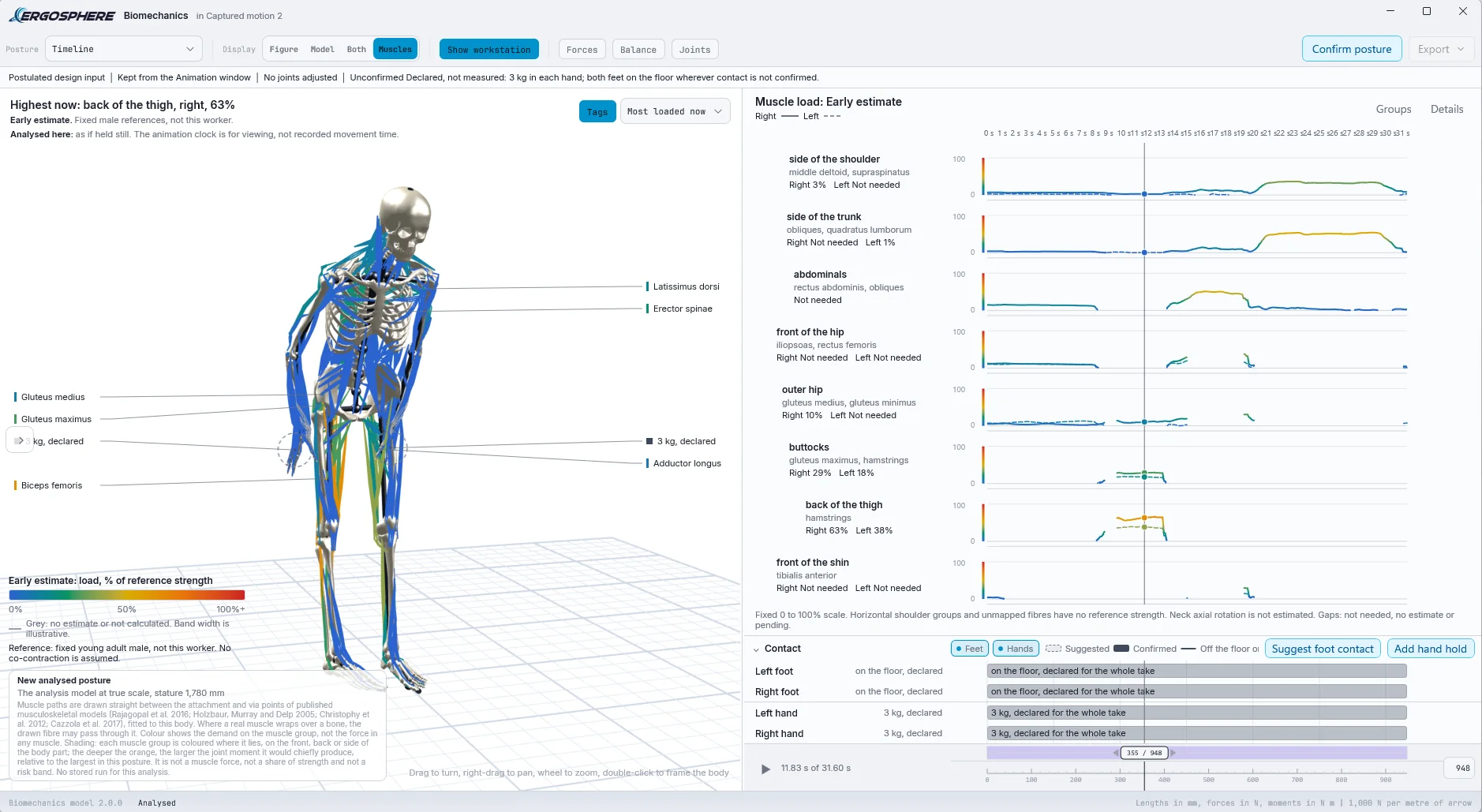
-
Load over the whole take
The most loaded muscle groups on one clock, eight here and four to twelve on the picker, right side solid and left side dashed, on a fixed 0 to 100% scale. A gap means not needed, no estimate or pending. It is never drawn as zero.
-
Contact, declared or suggested
Both feet on the floor and 3 kg in each hand, declared for the whole take. Suggest foot contact and Add hand hold set what the solver is allowed to lean on.
-
Unconfirmed until you say so
Results read Unconfirmed until the analyst presses Confirm posture. Change the posture, the body or the loads afterwards and the confirmation is withdrawn, and says so.
The Human Is The Datum.
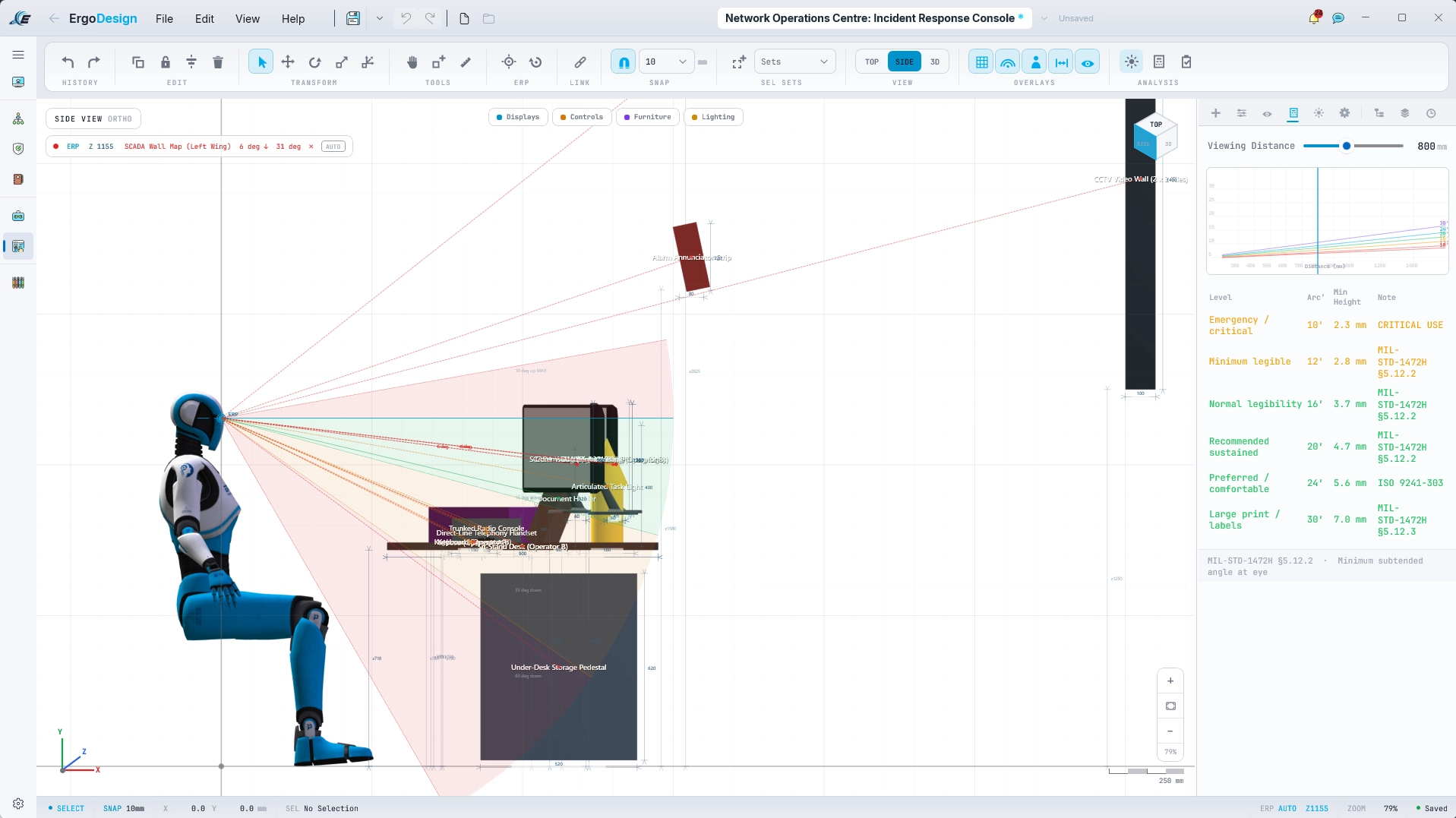
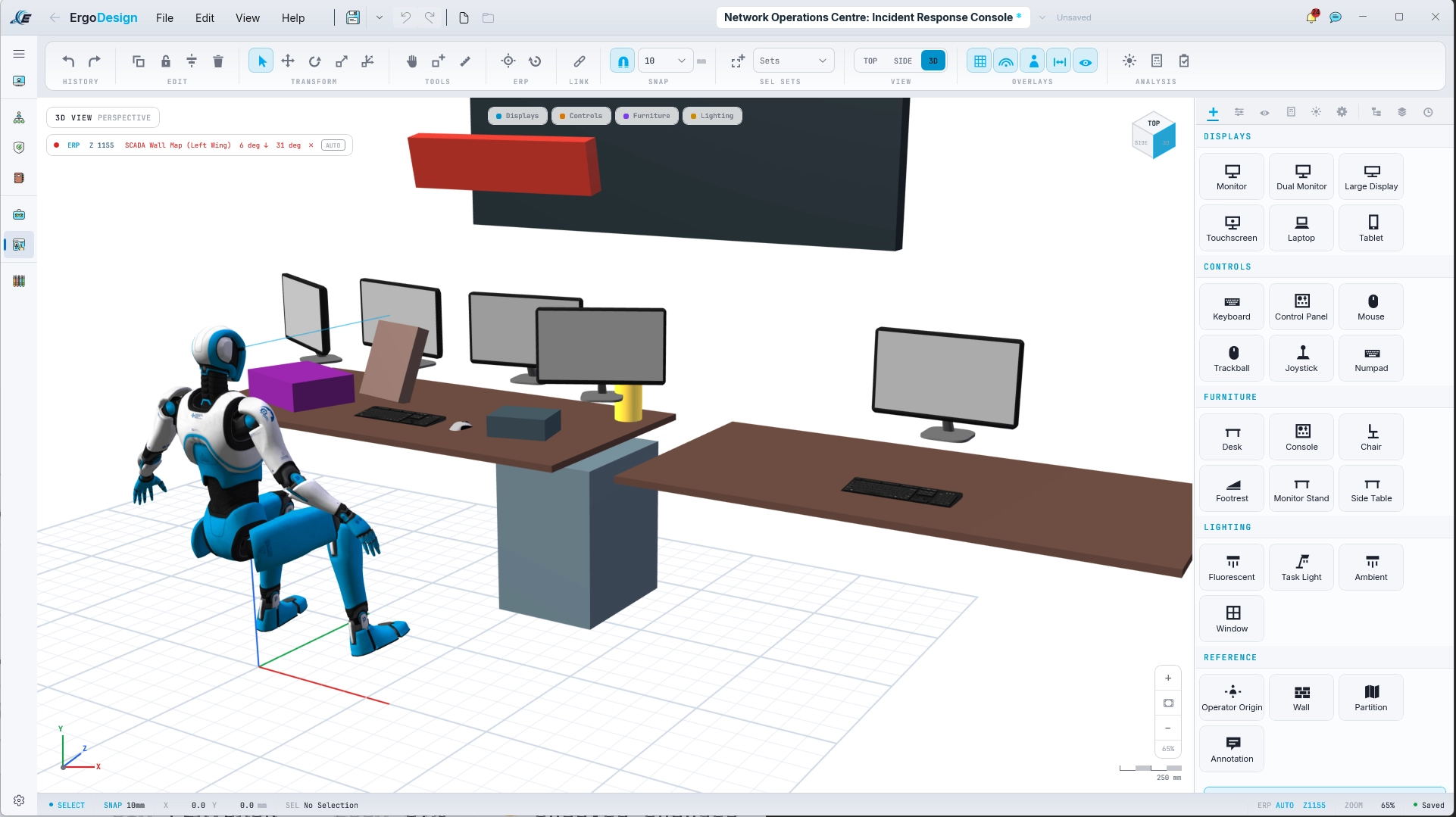
Most design tools draw the desk and then put a person at it. ErgoDesign starts from the figure. The Basis panel takes a percentile, sex, population and posture and returns the assessed Eye Reference Point, and every display, control and surface you place is scored from that point as you place it: viewing angle, lateral offset, reach distance, and the zone it falls in.
The population data is the anthropometric database MIL-STD-1472H itself designates, drawn from ANSUR II, with every percentile ladder reproduced from the source. Three figures are offered: the robot, a male and a female, chosen so that a posture reads as a posture and a clearance reads against a body. The assessed dimensions come from the basis panel alone.
- Layered vision cones with a standard selector, and reach envelopes, referenced to the ERP
- Every item listed with its angles and distance, and flagged where it breaches its zone
- Dimension chains, snapping and selection sets, so it works like a design tool rather than a diagram
- A library of displays, controls, furniture and lighting, and thirty-eight real materials drawn at real-world scale
- Views
- TOP
- RIGHT
- LEFT
- BOTTOM
- 3D
- EYE
- Quad view
- Cones
- MIL-STD-1472H
- ISO 11064
- ISO 9241-303
- NASA-STD-3000
- Per item
- Primary
- Secondary
- Tertiary
- Peripheral
- Optimal
- Acceptable
- Marginal
- Critical
img/screenshots/web/ergodesign-materials.webpFirst Person Is a Head, Not a Free Camera.
The EYE view puts the camera at the figure's computed eye point and keeps it there. An overlay draws the visual field as a clear centre, an amber ring and a red ring, with a legend saying what each means and which standard says so, and flat compasses read neck pitch and yaw.
Drag to turn the head and it moves inside the figure's own neck envelope, measured from the figure's facing, and stops at the limit. The normal line of sight sits below screen centre because that is where MIL-STD-1472H puts it. The head keeps its position when you return to 3D, and the look survives a posture change.
A visual field overlay that does not say which standard it came from is decorative. One that does is defensible in a submission.
- HUD
- Yaw and pitch rulers
- Comfort banding
- Line-of-sight notch
- Visual field legend
- Light and dark palettes
- Travels
- Report
- Free Viewer, head turns inside the same envelope
img/screenshots/web/ergodesign-eye-view.webpFifteen Bones Per Hand.
The request that drove this was simple: show an index finger operating a switch. The Fingers toggle on the Pose ribbon opens a pinned window with an illustrated hand. Click a finger to select it, drag its tip to curl it through four snapped stops, or choose a preset. Lift, neutral or press the selected finger, copy the hand to the other side, and undo one gesture at a time. Fifteen bones per hand, on all three figures.
Interact resolves through a nine-choice contact picker: palm, index fingertip and thumb tip on each hand, either wrist, and the head. The contact point is taken from the chosen figure's actual skin, the solve places that point on the surface, and when the figure cannot get there it reports the shortfall rather than stretching. Choose the head and a point and the gaze turns to it from the figure's own eye; if the neck envelope cannot reach, it clamps and says by how much.
A Comfort Limits toggle keeps posing within MIL-STD-1472H Table XXXI, thirty-six movements over eight body members, every row cross-checked against the corresponding table in 1472G.
- Presets
- Relaxed
- Flat
- Fist
- Power grip
- Point
- Pinch
- Contact
- Palm
- Index fingertip
- Thumb tip
- Wrist
- Head
- shortfall reported, never stretched
img/screenshots/web/ergodesign-fingers.webpimg/screenshots/web/ergodesign-contact-picker.webpThe Figure Moves.
An Animation button opens a floating window owned by ErgoDesign: a clip library on the left, a stage with a live figure, an inspector, a large timeline and a status bar. It runs on the same clock as the main time slider, so scrubbing one scrubs the other, and Drive main view plays the animation on the main viewport's figure. Space plays and pauses on a held frame, the arrows step a frame or, with Shift, a second, and every edit is one undo step.
Press, grasp, pull, point and look clips aim at a point picked on an item and follow it if the item moves. Where the figure cannot get there, the shortfall is stated, in millimetres for a reach and degrees for a gaze, and drawn on the stage as a dashed line. The figure is never stretched to close the gap. Lift and place clips pick up and set down a named item; a held box keeps its grip and rests where it is released, and every gesture re-solves when the design changes.
img/screenshots/web/ergodesign-animation.webpTwenty-seven clips, and yours
Eight poses, from standing relaxed to sit leaning forward. Seven motions, walk, walk carrying, step, lift by squat and by stoop, place at waist height. Twelve body-part clips, reach and press, grasp, pull down, point, look, glance, and six hand shapes. Every clip is generated inside the figure's joint limits and mirrors to the other side. A fourth shelf, Mine, holds your own, saved with the design.
Every value is a small control
Six body-part tracks expand into joint rows with live values and key diamonds. Drag a value, Shift for ten times, Ctrl for a tenth, double-click to type. Shoulders read elevation, direction and rotation; hips read flexion, abduction and rotation, each moving alone. Each hand carries five finger rows read as a curl word or a percentage, never degrees. Keyed equipment swings about its own pivot, so a door turns on its hinge.
The HTA's time, not yours
A band across the top shows the linked HTA's operations against time, from recorded times or observed medians with their count, hatched where a task has no time. Clips link to tasks and snap to them, and Fit to task states the change of speed as a percentage. Nothing is written back to the HTA. Beneath it a posture strip reads the demonstration ten times a second against DGUV Information 208-033 Annex 3, fourteen regions under a declared worst-of row.
Saved, transitioned, kept
A Saved postures shelf adds a posture to the timeline or builds a transition between two. Keep frame saves any instant to the posture library under an Animated origin, with the objects where they were at that instant, and the report prints it.
Upper and lower body routines
A RANGE group on the Pose ribbon plays the shoulder, elbow, forearm, wrist, neck and head, then the hip and knee one leg at a time, to the values of MIL-STD-1472H Table XXXI. The readout names each movement, its live angle and the source of its end value.
The client plays it too
When you opt in, the free Viewer plays the demonstration frame for frame with the application: the figure, its fingers, the moving items and the task band as a caption. Display only. The report knows its captures are stale the moment the animation changes.
Ask the Body What It Costs.
A Biomechanics button on the ribbon opens a fourth window beside Animation, Materials and the CAD sketch. A 3D stage at its centre shows the posed body at true scale in Figure, Model or Both, and now Muscles; the set-up on one side and the results on the other. It runs a full static analysis of the posture in front of it: the forces and moments at every major joint, the load on the low back, the share of the population strong enough to hold it, whether the body is in balance, and which muscles are carrying it. In 1.7 it follows the body through a recording or an animation, frame by frame.
It shares the design's posture library, its population, sex and percentile and its timeline, so scrubbing Main, Animation or Biomechanics moves all three. Underneath is an engine built from published literature alone. Every value it uses was read from the held source by page and table, twice and independently, and every modelling choice the literature does not settle is written down as a declared choice in the window's method and assumptions ledger.
Net force and moment, resolved into anatomical actions
A link-segment model from the segment parameters of de Leva, scaled to the analysed subject's sex, stature and body mass, posed by the figure's twenty-three segments. Hand loads are entered per hand, magnitude and direction, and No load is kept distinct from a load not yet stated.
- Wrists
- Elbows
- Shoulders
- Neck
- Head
- L4/L5
- L5/S1
- Hips
- Knees
- Ankles
Compression and shear, with a second opinion
L5/S1 and L4/L5 from the single equivalent muscle model of Chaffin, with its 5.0 cm moment arm and 40 degree standing disc angle, resolved by vector projection onto the disc. For L5/S1 the regression equations of Arjmand and colleagues give a second opinion inside the symmetric lifting range they were fitted to, and step aside with the reason outside it. The engine reproduces all fifty tasks of the published Arjmand table to within 1.5 N.
Limits are selectable and each applies only to the level its source covers. An L5/S1 disc pressure is offered as indicative, labelled as such, and compared with no limit.
LimitsNIOSH by default · Dortmund, Jäger (2018), by age and sex · shear, Gallagher and Marras (2012)Women and men, banded on NIOSH's own criteria
Each joint's required moment is set against population strength, with all 592 strength rows checked against their sources. A joint whose strength is not held reads Not assessed, in a neutral colour and never as a pass, and the whole-body line names the limiting joint and counts what it could not assess. Sustained holds gain an endurance estimate, and the trunk, head and upper arm gain ISO 11226 holding times with the standard's conditions stated.
SourceStobbe and Kumar in Chaffin, Andersson and Martin (2006) · Hughes et al (1999) · Harbo, Brincks and Andersen (2012) · Frey-Law et al (2012) · Frey Law and Avin (2010)Stable, Marginal, or Not statically possible
Standing on both feet, on one foot or seated, the engine builds the base of support from ANSUR II foot dimensions and the functional base of support by age group, and states the posture with its margin in millimetres. Where a posture cannot be held the foot reactions are withheld rather than invented. Each foot reports its share of the load and its centre of pressure, and a foot lifted clear of the floor is said to be off it, not pressed back down.
SourceANSUR II · Sloot et al (2025)The picture and the panels read one result
Force arrows at the hands, ground reaction arrows at the feet, the centre of mass with a plumb line to the floor, the full and functional base of support, the centre of pressure, and each joint coloured by its percent capable. They cannot disagree with the numbers beside them. A population scan applies the same posture to women and men at the 5th, 50th and 95th percentiles, and a sensitivity line shows how far the L5/S1 result moves when the trunk turns a little either way.
Every posture says where it came from
Each analysis keeps a copied record of its source: posed by hand, taken from the library, or brought in from an ErgoSense take or an ErgoLens capture with the take, frame and acquisition as recorded. Every joint carries a status, the joint rows show the seed value beside the current one, and any joint or the whole posture can be reset to its seed.
The body as it moves, frame by frame
A recording imported from a motion capture suit is read at its full native rate, and the legs gain the inertial terms of a moving body. An animation made in ErgoDesign is analysed on its own timing and labelled as animation timing, not a measured person; a library clip is held still and balanced for this body. Every viewing frame carries its own estimate, and Analyse animation reads the frames before the posture is confirmed. A Contact section on the timeline says where the feet are planted and what each hand carries, a box held in both hands counted once.
SourceKaratsidis et al (2017) · segment radii from de Leva (1996)Five lanes on the same take
Beside Muscle load, an Ergonomic assessment view runs RULA, REBA, L5/S1 compression from the single equivalent extensor, the NIOSH Lifting Index for a declared lift frame by frame, and the net joint reaction force, which says it excludes muscle forces. Inputs a posture cannot show are stated before any score appears.
SourceMcAtamney and Corlett (1993) · Hignett and McAtamney (2000) · NIOSH 94-110, revised 2021A dossier for every posture
The Findings tab reads one posture at a time: true-scale elevations over CUELA band rulers, the link model, compression and shear gauges on the chosen limit set's own lines, percent capable, balance with the base of support, and field of view, reach and contacts. Postures compare in library order, never ranked, and every section opens a Show the maths drawer with this pose's numbers and their sources.
Which muscles carry the posture, and how hard
The Muscles display draws the answer on the figure itself: 468 muscle fibres in twenty-two named groups, from the front, back and side of the neck to the front of the shin. Muscle paths run straight between the attachment and via points of published musculoskeletal models, fitted to this body; where a real muscle wraps over a bone, the drawn fibre may pass through it. Colour is the demand on the muscle group as a share of its reference strength, not the force in any one muscle. Shading tells you where it lies: the front, back or side of the body part, and the deeper the orange, the larger the joint moment it would chiefly produce.
The right-hand panel reads the same result over time: the most loaded groups, eight by default and four to twelve on the picker, head to toe, right solid and left dashed, on a fixed 0 to 100% scale, each with its peak and mean in Details. Groups or Details, Tags, and Most loaded now to sort by what is working hardest at the playhead. Horizontal shoulder groups and unmapped fibres have no reference strength and say so; neck axial rotation is not estimated.
For a closer look, Run estimates the activation of individual muscles from a combined published model of 722 muscles, by static optimisation that minimises the sum of cubed activations. A result is shown only once the solver's answer is proven optimal by an independent check, it is labelled an unvalidated estimate, not an EMG measurement, and the run is saved with the project.
Grey: no estimate or not calculated. Band width is illustrative. The analysis is of the posture as if held still; the animation clock is for viewing, not recorded movement time.
img/screenshots/web/ergodesign-biomechanics-assessment.webpimg/screenshots/web/ergodesign-biomechanics-forces.webpimg/screenshots/web/ergodesign-biomechanics-balance.webpUnder guard. A posed figure may carry a biomechanical analysis provided its provenance is recorded and shown beside the numbers, and one engine computes joint moments and spinal load so two surfaces can never disagree. Results read Unconfirmed until the analyst confirms the posture. Muscle load is an early estimate against fixed references, not this worker, and it stays in this window: a guide to support your judgement, not a measurement of muscle activity.
Measured, Not Posed.
A designed posture is a postulate. ErgoDesign lets you replace it with a recorded one. Pose imports an ErgoLens still or a chosen video frame, fits it to the current figure and applies it as an editable pose in one undo step. Animation imports an interval of an ErgoSense take or an ErgoLens recording as editable full-body keys, keeping the elapsed timing and the design's own body dimensions, for up to 180 seconds. The camera assumptions are stated, never guessed, and the capture history travels with the pose.
An OPERATOR group imports a window of up to thirty minutes of a measured ErgoSense take as an unchangeable copy with its provenance: session, take, instrument, window, rate and frames used. The operator is drawn at true size from their own captured segment lengths, beside the design's figure rather than in place of it. Playback runs at one, four or sixteen times, the EYE view rides the operator's measured head, displays are tinted by dwell share, and a MEASURED OPERATORS card in Findings gives dwell, look-down angle, head angles and viewing distance per display, with the ten worst moments, each of which seeks the timeline.
And ErgoLens can now record from two or three calibrated cameras at once, combining the views into one skeleton measured in three dimensions.
- In
- ErgoLens still
- ErgoLens video frame
- ErgoLens recording
- ErgoSense take
- provenance kept, scores and confirmations do not travel
img/screenshots/web/ergodesign-measured-operator.webpimg/screenshots/web/ergodesign-pose-import.webpDigital Human Modelling, Inside the Programme.
ErgoDesign is a core tool in the Systems Engineering pack, beside the task analysis, the registers, the assurance workspace and the deliverables that the design finding has to land in. The design finding lands in the Issues Register, in the compliance claim and in the issued report, in the same file.
AUD, excluding GST. ErgoDesign is core. Two picks from the rest of the catalogue come with it.
- Monthly over 12 months$242
- Exit anytime$319
- 11 to 25 seats, yearly, each$2,300
Elsewhere in the catalogue ErgoDesign is a premium pick, costing two of a pack's picks, from $1,500 a seat. Full, every tool and module, is $4,900.
Core in the pack with ErgoDesign
- ErgoDesign
- HTA
- SCTA
- GOMS
- GDTA
- SHERPA
- CWA
- Link Analysis
- Project Management
- Assurance
- Registers
- Deliverables
- Multi-tool session
Modules in cyan. Every pack carries Deliverables, so the report, the close-out and the free Viewer package are never extras.
Need to take this to a manager? The business case, with the arithmetic already done. Buying for a team? The seat bands.
The Drawing That Answers Back.
A dimensioned workstation, an operator who can see, reach and press, a task played at the HTA's own pace, and a body that tells you what every posture costs. One model. One file. One of the 60 tools.